
Meal planning
AnyList vs RecipeRun for Australian Households (2026)
AnyList and RecipeRun compared for Australian households on devices, shared lists, recipes, meal plans and supermarket prices, with where AnyList is ahead stated plainly. Written by the RecipeRun team.
Quick answer: Both give an Australian household one grocery list that everyone shares live, on iPhone and Android. They start from different places. AnyList is a long-established list app that runs on more devices; RecipeRun starts from your recipes and weekly plan, and prices the list at your local supermarkets.
- AnyList: pick it if the list itself is the point: Siri and Alexa, and with AnyList Complete the web, Mac and Apple Watch, photos on items and prices you type in yourself.
- RecipeRun: pick it if the shopping starts with what you're cooking this week, and you want estimated totals at your local Woolworths, Coles and ALDI.
We make RecipeRun, so this is a comparison by one of the entrants, not an independent review. We checked AnyList's website, features page, AnyList Complete page and Australian App Store listing on 4 November 2026. AnyList's prices and features can change, so confirm before you pay.
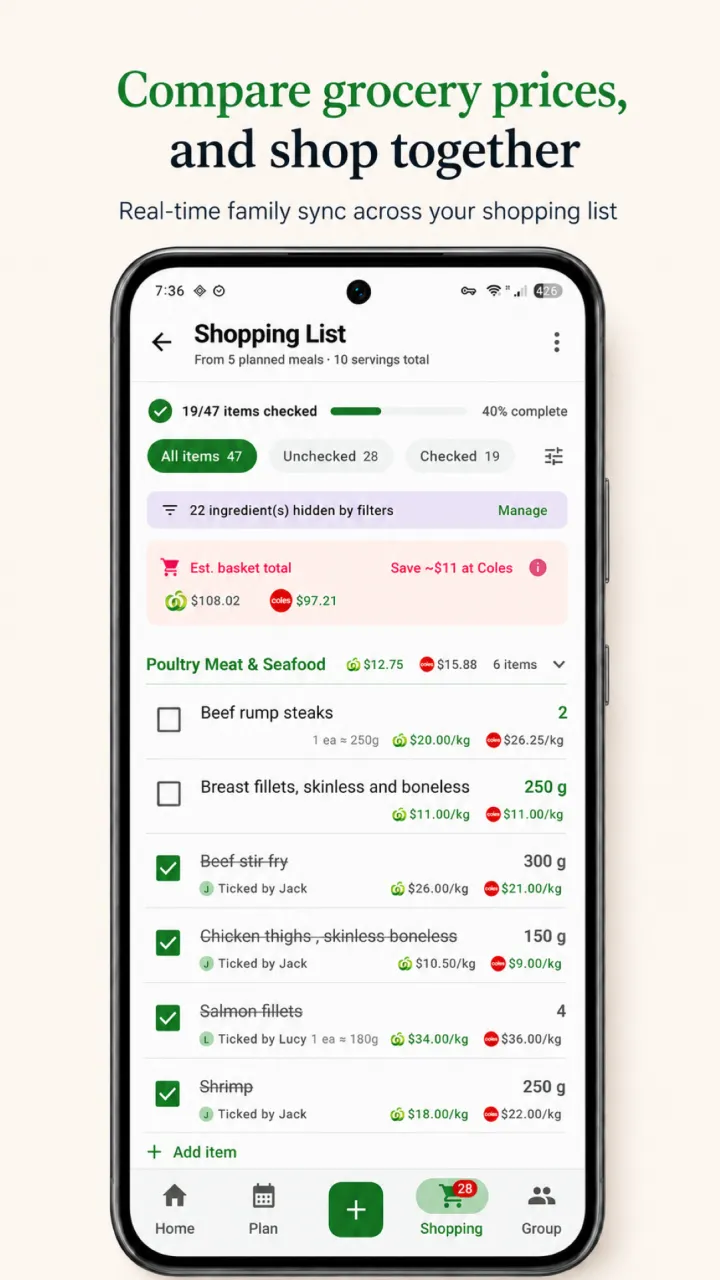
AnyList and RecipeRun side by side
Swipe horizontally to compare
| What you need | AnyList | RecipeRun |
|---|---|---|
| Shared household list | Yes; changes show up instantly for everyone sharing the list | Yes, in a Family Group; ticked items sync for everyone |
| Where it runs | iPhone, iPad and Android; the web app, Mac app and Apple Watch with AnyList Complete | Android and iOS phones; no web or desktop app |
| Adding to the list | Autocomplete, automatic categories, and Siri or Alexa; item photos with Complete | The week's recipes write the list, without double-ups |
| Recipes | Collect and organise recipes; import from popular websites, five on the free version and unlimited with Complete; scaling and recipe photos with Complete | Save from websites, TikTok and YouTube links, video files, photos, screenshots and handwritten cards; set the servings for the meal you're planning |
| Meal plan to list | A meal-planning calendar, a list generated from the plan and a meal plan shared with your household, with Complete | Give each recipe a day and the week's ingredients become one list |
| Prices | Type in your own prices for a running total, including for more than one store, with Complete | Estimated totals at your chosen local Woolworths, Coles and ALDI, with the product behind every price |
| Woolworths, Coles and ALDI | Not mentioned on its website, features page or App Store listing | Your local stores, chosen by postcode |
| Cost | Free; AnyList Complete A$14.99 a year, or A$22.99 for a household, on the Australian App Store | No ads |
The AnyList column is what its website, features page and Australian App Store listing said on 4 November 2026. The RecipeRun column is from our own product pages.
RecipeRun: a shared list that comes out of your meal plan
RecipeRun starts a step before the list. Save the recipes your household cooks from websites, TikTok and YouTube links, video files, photos, screenshots and handwritten cards, put each one on a day, and the week's ingredients become one grocery list without double-ups. In a Family Group each person has the same recipes, plan and list on their own phone, and when someone ticks an item off in the shop it is ticked for everyone.
Then the Australian part. Pick your nearest Woolworths, Coles and ALDI by postcode, and the list gives an estimated total for each store along with a count of the items that store couldn't match. Tap a price to see the product behind it and the other options at that store; the app remembers what you choose for next time. Cheapest mode then sorts the matched items under whichever store has the lowest price for each one. The family grocery list page shows how the shared list works.
Where RecipeRun differs: you don't type prices in; it estimates them for your local Woolworths, Coles and ALDI. Recipes come in from TikTok and YouTube links, photos and handwritten cards as well as websites, and you set each recipe's servings when you give it a day in the plan.
Where it falls short. RecipeRun is only on Android and iOS phones, with no web or desktop app, so if you plan at a keyboard, AnyList's web and Mac apps will suit you better. Its prices are estimates and can trail the shelf, which is why every store's total comes with a count of what it couldn't match.
AnyList: the polished, long-running shared list
AnyList is a long-established list app, and a lot of it is free. In the words of its features page: "AnyList is a free download for iOS & Android. Core functionality, like creating and sharing lists, is free to use." Its homepage adds: "Any changes made to a shared list will show up instantly to everyone sharing the list." The free version also has favourites, autocomplete and automatic categories, categories you can customise to match your store, notes and quantities, adding items with Siri or Alexa, copy and paste, email and print, widgets and basic themes. Recipes are in it too: collect and organise them, add their ingredients to the list, import up to five from popular websites, and cook with a cooking mode.
AnyList Complete is the optional paid upgrade. Its features page lists item photos, stores and filters, folders, more themes, location reminders and a passcode lock; Apple Watch, the web app and the Mac app; a meal-planning calendar that generates a grocery list and that you can share with your household; recipe scaling, photos on recipes and unlimited recipe imports from the web; and prices. "Stick to your budget by adding prices to items," it says: you type prices in, see a running total, and enter prices for more than one store to find out where you can save.
The Australian App Store listing shows AnyList Complete at A$14.99 for a 12-month individual subscription and A$22.99 for a one-year household subscription. AnyList's own Complete page and features page show lower figures, $9.99 a year for one person and $14.99 for a household, without naming a currency; the App Store figures are the ones the Australian listing shows.
What AnyList lists that RecipeRun's pages don't:
- It runs on more devices: iPhone, iPad and Android, plus the web, Mac and Apple Watch with Complete. RecipeRun is phone-only.
- Siri and Alexa can add items to the list.
- Its shared list is long established.
- Photos on list items, with Complete.
- You can type in your own prices, with Complete, for whichever stores you shop at.
What isn't listed: Woolworths, Coles and ALDI aren't mentioned on its website, features page or App Store listing, and nothing there describes comparing supermarket prices automatically. Its features page mentions shopping online at "Walmart, Instacart, Kroger and more".
Which should you choose?
Pick AnyList if:
- you want the list on a computer or a watch as well as your phone;
- you want to add items by voice with Siri or Alexa, which AnyList lists and RecipeRun's pages don't mention;
- your household mainly needs a fast shared list, and recipes are an occasional extra;
- you'd rather type in prices yourself for the shops you use.
Pick RecipeRun if:
- your shopping starts from the recipes you cook and a plan for the week;
- you save recipes from TikTok, YouTube, photos or handwritten cards as well as websites;
- you want the list priced at your local Woolworths, Coles and ALDI without entering prices;
- you're happy to plan on your phone.
Either way, run one ordinary week through it: plan the meals, write the list, and let two people tick things off in the shop. You'll learn more from that than from any feature table, including this one.
If you want a shopping list that compares Australian supermarket prices without starting from recipes, the best shopping list apps in Australia round-up and our WiseList alternatives page cover the price apps. To see how the three supermarkets compare on a real basket, read which of ALDI, Coles and Woolworths is cheapest.
Frequently asked questions
Is AnyList free?
Yes, for the core: its features page calls AnyList a free download for iOS and Android, with creating and sharing lists free to use. AnyList Complete, the paid upgrade described above, was listed on the Australian App Store at A$14.99 a year for one person or A$22.99 for a household on 4 November 2026.
Does AnyList compare Woolworths, Coles and ALDI prices?
Not that its pages say. Woolworths, Coles and ALDI aren't mentioned on its website, features page or App Store listing. With AnyList Complete you can type in your own prices, including for more than one store, and see a running total.
Do AnyList and RecipeRun both work on iPhone and Android?
Yes, so a mixed household can share one list in either. AnyList also has a web app, a Mac app and Apple Watch with AnyList Complete; RecipeRun is phone-only.
Can AnyList make a grocery list from a meal plan?
Yes, with AnyList Complete: its features page lists a meal-planning calendar, a grocery list generated from the plan and sharing the plan with your household. In RecipeRun, the week's recipes become the list, and a Family Group shares the recipes, plan and list.
Does RecipeRun have a web or desktop app?
No. RecipeRun is on Android and iOS phones only. If you plan at a keyboard, AnyList's web and Mac apps, with Complete, will suit you better.
Sources
- AnyList website, features and plan comparison, AnyList Complete and Australian App Store listing.
- RecipeRun family grocery list, family meal planner and recipe manager.
Competitor names and trademarks belong to their owners. RecipeRun is not affiliated with or endorsed by AnyList, Purple Cover, Inc. or any supermarket named here.
Who wrote this, and how we checked
The RecipeRun team wrote this head-to-head, so it is not an independent review: we gain if you pick RecipeRun over AnyList. Every AnyList detail comes from its homepage, features page, AnyList Complete page and Australian App Store listing, which we read on 4 November 2026. We haven't used AnyList ourselves, so this is what AnyList says about its own app. Plans and prices change, so confirm before you pay.