
Links and video
Import a website or cooking video
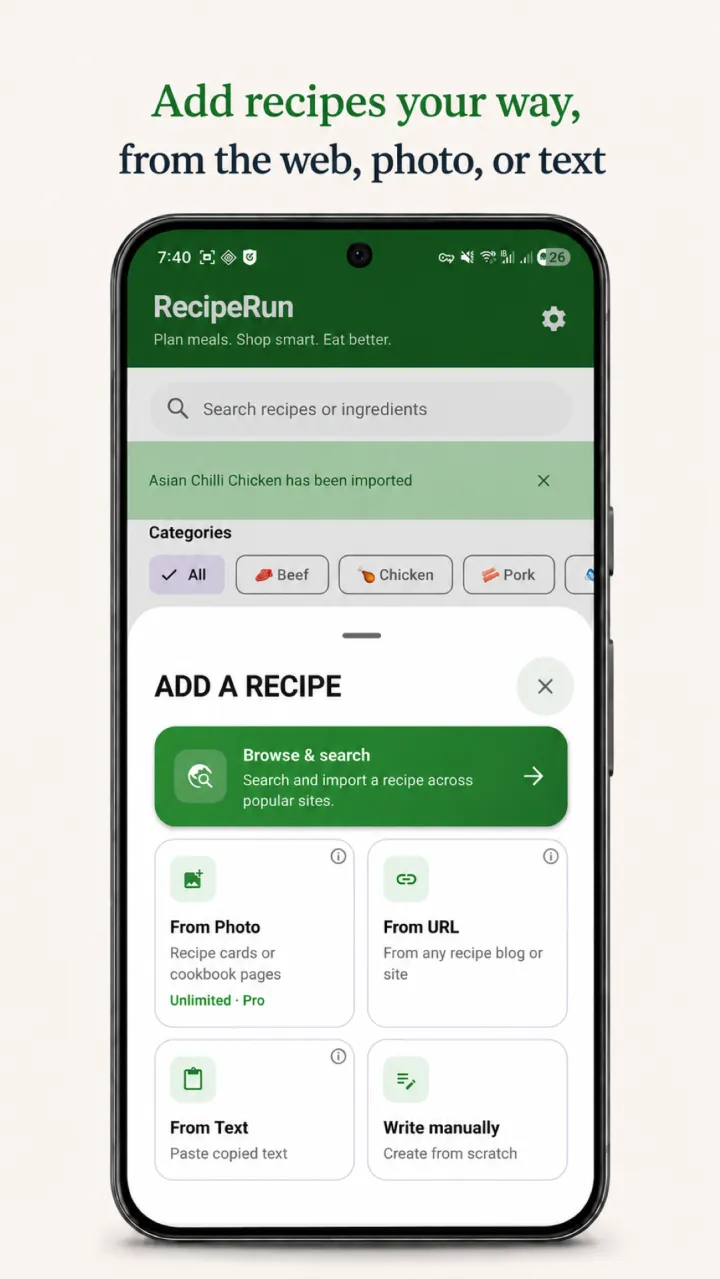
Paste a cooking-website, TikTok, or YouTube link, or upload a video file. RecipeRun extracts a recipe you can review and save.
Recipe manager app for Android and iOS
Save recipes from websites, TikTok and YouTube links, video files, photos, and handwritten cards in one searchable library. Choose your meals and RecipeRun builds the grocery list without double-ups.


Free to download · Recipe management, meal planning, and grocery lists work worldwide
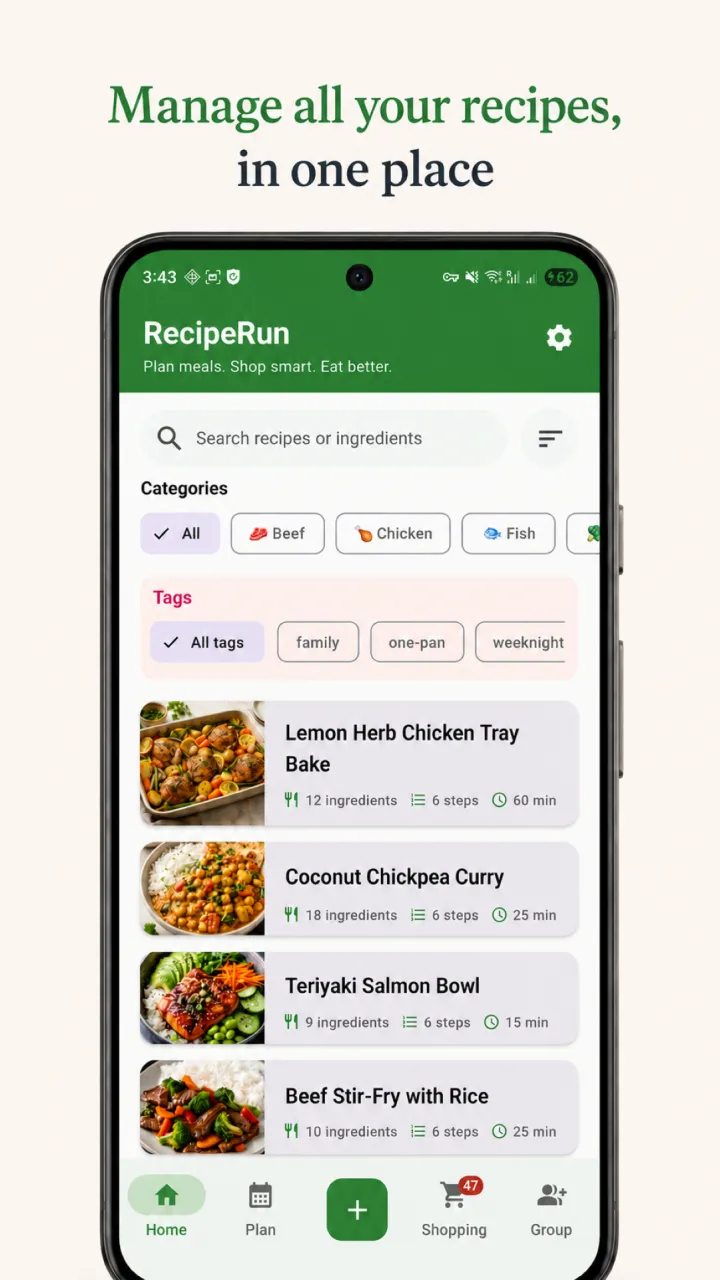
Your recipe library
Whether you call it a recipe manager, recipe organiser, or digital cookbook, the goal is the same: keep recipes easy to find and ready to use when you plan the week.
Links and video
Paste a cooking-website, TikTok, or YouTube link, or upload a video file. RecipeRun extracts a recipe you can review and save.
Photos
Upload a photo or screenshot, or photograph a cookbook page or handwritten recipe card, then review the extracted recipe before adding it to your library.
Library
Keep recipes from different sources together in one searchable library instead of scattered across tabs, screenshots, and recipe books.
Choose breakfast, lunch, and dinner for each day from the recipes you have saved. Your weekly meal plan keeps everything you intend to cook in one place and prepares the ingredients for your next shop.
RecipeRun connects the recipe library, meal planner, and grocery list, so each part follows the same plan instead of becoming another separate list to maintain.
Plan once, shop together
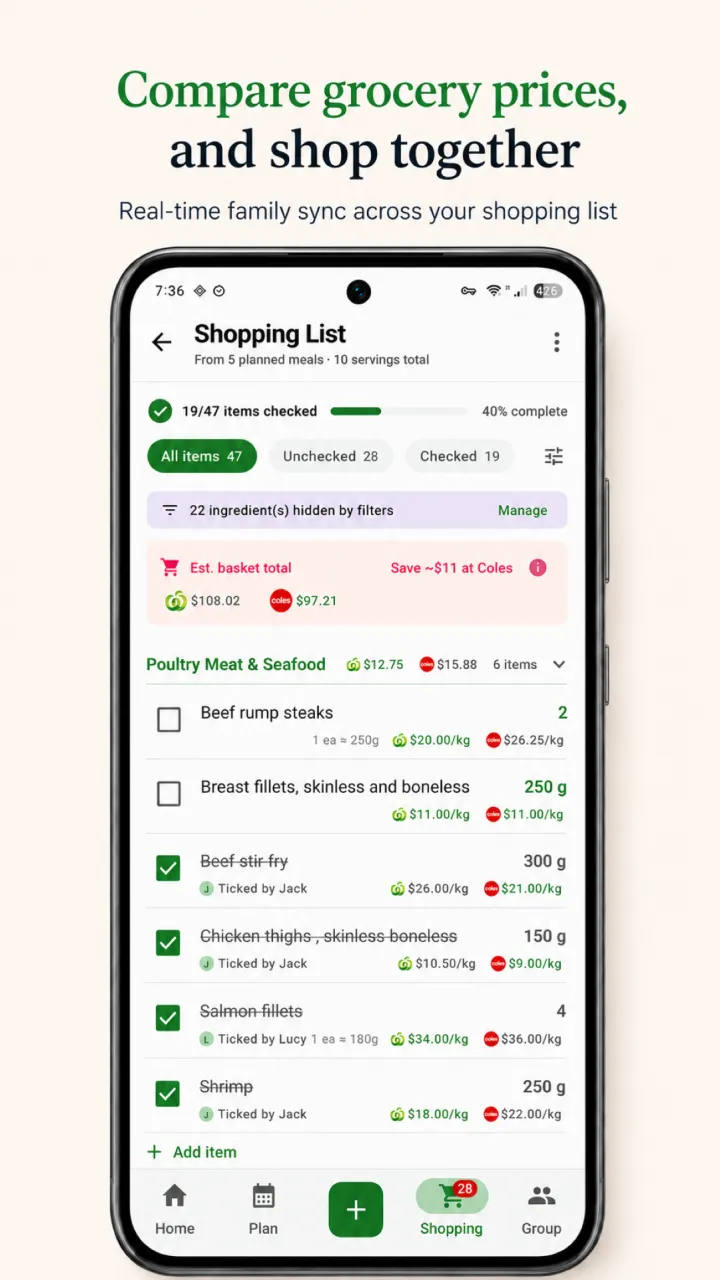
Generate a grocery list from your weekly meal plan instead of copying every ingredient by hand. RecipeRun avoids double-ups and keeps the list up to date when your plan changes.
Build a recipe collection from the cooking sources and family recipes you already use.
Pick saved recipes for breakfast, lunch, or dinner and keep the household plan in one view.
Bring the ingredients together, avoid duplicate items, and check them off as you shop.
Family Groups
Family Groups let household members share recipes, the weekly meal plan, and the shopping list in real time. When someone checks or unchecks an item, everyone sees the change, helping the household avoid buying the same thing twice.
Built for grocery runs
For Australian households, RecipeRun shows indicative prices for selected products at Woolworths, Coles, and Aldi. Choose local stores by postcode and compare the grocery list you are actually planning to buy.
See how to compare Woolworths, Coles & Aldi pricesBuilt around your choices
RecipeRun does not require your name, email, or password for core use. Your recipe content can stay on your device when you keep sync and online-processing features off.
Recipe manager FAQ
Practical answers about recipe imports, automatic lists, household sharing, platforms, and pricing.
A recipe manager app keeps recipes in one place so they are easier to find, plan, and cook. RecipeRun combines a searchable recipe library with weekly meal planning and automatic grocery lists. In Australia, it can also compare indicative prices at Woolworths, Coles, and Aldi.
Yes. Paste a TikTok, YouTube, or cooking-website link; upload a video file, photo, or screenshot; or photograph a recipe page or handwritten card. RecipeRun extracts the ingredients and steps into a recipe you can review before cooking.
Yes. Add recipes to your weekly meal plan and generate a grocery list from their ingredients. RecipeRun avoids double-ups and updates the list when your meal plan changes.
Yes. Photograph a handwritten recipe card and RecipeRun can extract its ingredients and instructions, giving old family recipes a place in your searchable library.
Yes. Family Groups let household members share recipes, weekly meal plans, and a shopping list. List changes sync in real time for everyone in the group.
Yes. Recipe management, meal planning, and grocery lists work worldwide. Woolworths, Coles, and Aldi price comparison is currently available for Australian households.
Start your recipe library
Download RecipeRun free on Android or iOS and take your saved recipes from “what should we cook?” to a grocery list ready for the shops.