
Recipe organisation
Why RecipeRun Is Different: A Recipe Manager That Respects Your Choices
The RecipeRun philosophy: a useful free core, no third-party ads, no forced personal profile and clear choices about sync and online features.
Quick answer: RecipeRun is built to be useful without third-party ads, a forced personal sign-up or a subscription blocking the core recipe-to-grocery-list workflow. You can save and organise recipes, plan meals and build grocery lists without paying. Optional Pro features are available for people who want extras such as unlimited imports, full store comparison, Family Groups and cloud backup. Your recipe content can also remain on your device when you keep sync and online-processing features off.
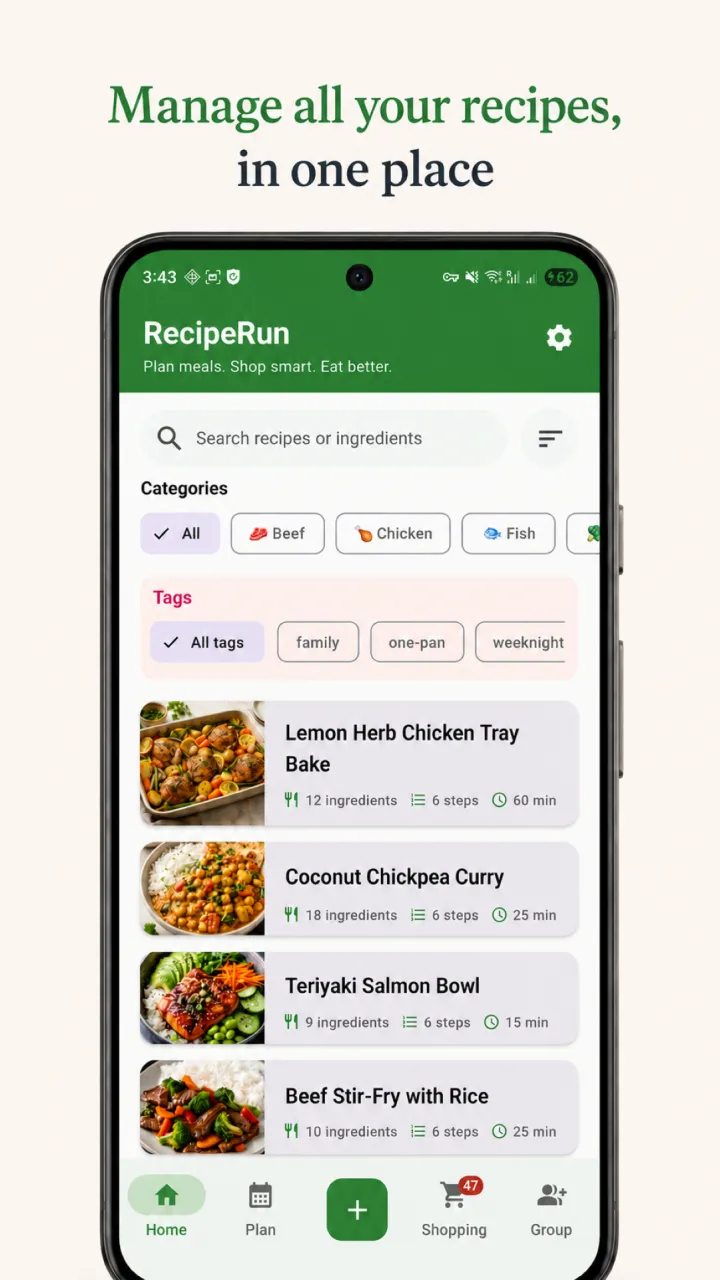
Many apps are designed to maximise the time you spend inside them. RecipeRun is designed around a different goal: help you decide what to cook, prepare the list and get on with your day.
That philosophy affects the business model, account experience and data choices. It does not mean every feature is free or that the app never contacts an online service. It means the useful core is available without a subscription and the optional features are explained rather than disguised.
The philosophy: useful first, optional extras second
RecipeRun should earn a place on your phone by removing work. A recipe manager is useful when it makes scattered recipes searchable, connects them to a weekly plan and turns that plan into a practical grocery list.
Those core tasks work without a paid subscription. RecipeRun does not make you build a collection and then put the basic recipe-management workflow behind a paywall.
There is an optional Pro subscription. Pro adds features such as unlimited recipe imports, full supermarket comparison, Family Groups and cloud backup. Those features cost money to provide or support more advanced household workflows. The distinction is meant to be straightforward: the free app remains useful, while Pro is there for people who value the extras.
No third-party ads in the app
RecipeRun does not display third-party ads. You do not have to trade screen space or attention for access to the free app.
RecipeRun also does not sell or rent your personal information. Its service providers are not allowed to use your RecipeRun content for their own marketing or advertising. The detailed commitments, providers and exceptions are set out in the RecipeRun Privacy Policy.
This matters because an ad-free interface is more than a visual preference. It removes the incentive to interrupt a cooking task with promoted content.
Website analytics, explained
The RecipeRun website uses Google Analytics 4 to understand visits, page use and app-store-link clicks. The website tag is configured to disable Google signals and advertising-personalisation signals. Website analytics are separate from the RecipeRun app and do not receive your private recipes, photos, meal plans or shopping lists.
Google Analytics can collect session statistics, approximate location, browser and device information, and a pseudonymous client identifier stored in a first-party cookie. We disclose this because “no ads” should not be stretched into an inaccurate “no measurement anywhere” claim. Read the website analytics section of the Privacy Policy for details.
No forced personal sign-up
You do not need to hand RecipeRun your name, email address or password before using the core app.
There is one technical detail worth making explicit. On first launch, RecipeRun creates an anonymous Firebase Authentication account behind the scenes. This allows the app to apply feature limits and associate cloud-enabled features with the correct app user. It is not a personal profile and no name, email or password is required at that stage.
If you deliberately choose a feature that needs identity or sharing, such as joining or creating a Family Group, you may link a Google or Apple account. That additional sign-in is connected to the feature you chose; it is not a gate placed in front of basic recipe organisation.
That is why our precise promise is no forced personal sign-up, rather than claiming that the app has no account system at all.
No engagement bait
RecipeRun is designed to help you complete a practical task: save a recipe, plan meals, build a list, cook or shop, then get on with your day.
It is not trying to turn that task into an endless content feed. There are no third-party ads to scroll past and no ad-supported business model that benefits from stretching a two-minute planning task into a twenty-minute session. When the job is finished, RecipeRun has done its job.
This is a product principle, not a claim that every screen will always be perfect. If a feature begins to create pressure without making planning, cooking or shopping easier, it should have to justify its place.
A local-first choice for your recipe content
Recipes can be personal: family instructions, photographs, notes, meal routines and a record of what your household buys. RecipeRun is designed so that the content you create can remain on your device when you do not use features that need online processing or sync.
“Local-first” does not mean pretending the internet is never involved. The exact behaviour depends on what you choose:
Swipe horizontally to compare
| What you choose to do | What happens to your data |
|---|---|
| Create recipes, meal plans and grocery lists without Family Groups or photo import | The content is stored in the app's local database on your device. On iOS, it also syncs to your own iCloud account if iCloud sync is on. |
| Import a recipe from a website URL | The page is downloaded and processed on your device. The request goes directly to the recipe website; RecipeRun does not receive or store the URL on its servers. |
| Import a recipe from a photo | The photo is sent securely for online AI processing. RecipeRun does not use the photo to train AI models and does not intentionally retain it after processing, subject to the temporary and legal exceptions in the Privacy Policy. |
| Use a Family Group | Shared recipes, plans, lists and group information are stored in cloud services so group members can see and update them. |
| Turn on cloud backup or sync | Android backups go to your own Google Drive when you choose to create one. On iOS, app data syncs to your own private iCloud database while iCloud sync is on. |
| Allow crash reports | Technical crash details can be sent to Firebase Crashlytics. Reports do not include your recipes, photos, meal plans or shopping lists, and you can change the setting under Settings → Privacy. |
If you want your recipe content to stay on one device, avoid Family Groups and photo import, leave optional backup or sync off, turn off iCloud sync on iOS, and disable crash reporting. The anonymous app account and app-integrity checks may still contact service providers, but they do not include the recipes, meal plans, shopping lists or other content you create.
This is a more accurate promise than saying “absolutely nothing ever leaves your phone.” It gives you a practical way to keep your cooking content local while explaining the limited technical services the app still uses.
Choice also means being honest about the limits
RecipeRun is not subscription-free. Some features require Pro, subscriptions renew unless cancelled through the relevant app store, and free-tier limits can change. The current inclusions and subscription terms are described in the RecipeRun Terms of Service and in the purchase screen before payment.
RecipeRun is also not an offline-only app. Photo extraction, Family Groups, subscriptions, optional backup and sync, app integrity and crash diagnostics rely on third-party services in the circumstances described above.
Those qualifications do not weaken the philosophy. They are part of it. Respecting your choices requires saying what is optional, what is paid and what happens when a feature needs the internet.
What this means in everyday use
You can download RecipeRun and begin organising recipes without creating a personal profile. You can use the recipe library, meal planner and grocery list without subscribing. You will not see third-party ads between those tasks. You can decide whether the convenience of photo processing, household sharing or cloud backup is worth sending the relevant data online.
The aim is not to force every person into the same setup. Someone who wants a simple local recipe collection should be able to have one. A household that wants live shared lists should be able to choose that too. Pro should add value; it should not hold your existing recipe collection hostage.
Frequently asked questions
Is RecipeRun usable without a subscription?
Yes. RecipeRun is free to download and the core recipe-management, meal-planning and grocery-list workflow works without a paid subscription. Pro adds optional extras including unlimited imports, full supermarket comparison, Family Groups and cloud backup.
Does RecipeRun contain ads?
The app does not display third-party ads. RecipeRun does not sell or rent your personal information, and its providers are not allowed to use your RecipeRun content for their own marketing or advertising.
Do I have to create an account before using RecipeRun?
You do not have to create a personal profile or provide a name, email address or password for core use. RecipeRun automatically creates an anonymous technical account on first launch. Google or Apple sign-in may be used when you choose features such as Family Groups.
Can I keep my recipes only on my device?
Yes, with the relevant settings and feature choices. Do not use Family Groups or photo import, keep optional cloud backup or sync off, and turn off iCloud sync on iOS. URL imports are processed on your device, although your device still connects directly to the source website.
Can I turn off diagnostics?
Yes. Crash reporting can be changed in Settings → Privacy → Send crash reports. Outside the EEA, UK and Switzerland it is on by default; in those regions it remains off until you opt in. Crash reports do not include your recipes, photos, meal plans or shopping lists.
Try RecipeRun on your terms
RecipeRun is free to download from Google Play and the App Store. Start with the free core, keep your content local if that is what you prefer, and only use the connected or Pro features that are useful to you.
For a feature-by-feature view, read the RecipeRun recipe manager and grocery list guide. You can also compare the documented strengths and trade-offs of recipe manager apps available in Australia.
Product and policy sources
- RecipeRun Privacy Policy, including local storage, authentication, online processing, diagnostics, website analytics and cloud sync.
- RecipeRun Terms of Service, including free-tier limits, Pro subscriptions, accounts and third-party services.
- RecipeRun recipe manager overview, including the current core and Pro feature descriptions.
- Google documentation for default Analytics data collection and Google tag privacy controls.
This article describes RecipeRun's product philosophy and current documented behaviour. It is written by the RecipeRun team and is not an independent review.