
Recipe organisation
Best Recipe Apps in Australia (2026): 7 Apps Compared
Quick answer: if you want one recipe manager app to take recipes from your phone to a weekly plan, then to a grocery list your household shares and can price at your local Woolworths, Coles and ALDI, the best fit in Australia is RecipeRun. It is free to download, has no ads, and the core features need no sign-up. If your priority is something else, one of the six apps below may suit you better:
- Paprika: offline recipe management on desktop and phone, with pantry tools.
- Recipe Keeper: scans photos, PDFs and handwritten cards, runs on desktop too, and prints cookbooks.
- ReciMe: imports from more social apps and lets you build cookbooks with other people.
- Samsung Food: recipe discovery, nutrition features and a web version.
- Plan to Eat: detailed, reusable meal planning on desktop and mobile.
- Pinch: supermarket price history, price alerts and Harris Farm coverage.
We make RecipeRun, so read this as a comparison by one of the entrants rather than an independent review. Each rival gets its advantages stated plainly, and how we checked is at the end.
Looking for NeatEat or TapCook? They are budget meal planners rather than recipe managers, so we cover them separately in NeatEat alternatives in Australia and TapCook alternatives in Australia.
Comparison at a glance
Swipe horizontally to compare
| App | Recipes to plan to list | Shared household list | Australian supermarket prices | Free tier | Desktop or web |
|---|---|---|---|---|---|
| RecipeRun | Yes | Yes, live sync in a Family Group | Woolworths, Coles and ALDI, at your chosen local stores | Free to download, no ads | No, Android and iOS only |
| Paprika | Yes | Sync between your own devices; family sharing is in the Paprika 4 beta | No | Free Android version up to 50 recipes; apps bought per platform | Yes, macOS and Windows |
| Recipe Keeper | Yes | Shared family recipe collection and meal plan; shared list not stated | No | Free to use; $29.99 Pro upgrade; other platforms bought separately | Yes, Mac and Windows |
| ReciMe | Yes | Collaborative cookbooks (iOS only); lists shared by using one login | No | Five smart imports a week; Plus priced by plan and region | Recipes on the web; planner is mobile-only |
| Samsung Food | Yes | Yes, shared grocery lists | No | Free; Food+ optional | Yes, web app and browser extension |
| Plan to Eat | Yes | Yes, one account for the household | No | 14-day trial, then a subscription; no free plan | Yes, desktop site |
| Pinch | Recipe or plan to a compared basket | Yes, shopping lists can be shared | Woolworths, Coles, ALDI and Harris Farm; its App Store listing adds Umall | Free | No, iOS and Android |
We checked the providers' websites and Australian App Store listings on 15 October 2026. "Not stated" means the provider's own pages do not mention it. Prices and limits change, so confirm before you pay.
RecipeRun: the whole week in one app, priced at your local shops
RecipeRun does both halves of the job: a grocery list priced at your local Woolworths, Coles and ALDI, and a list the whole household shares and ticks off together. Pinch, further down, also prices a list at those supermarkets and shares it with family. RecipeRun starts from the recipe collection you build, and a Family Group shares the recipes and the weekly plan as well as the list. Recipes come in from websites, TikTok and YouTube links, video files, photos, screenshots and handwritten cards. Each saved recipe gets a day in the week, and the week's ingredients become one list.
The Australian part is the shopping. Pick your local stores by postcode and the list shows an estimated total at each, with the product behind every price and a count of anything it could not match, so you can see the gaps rather than guess at them. Tell it which brand or pack you normally buy and later comparisons use that instead of a generic match.
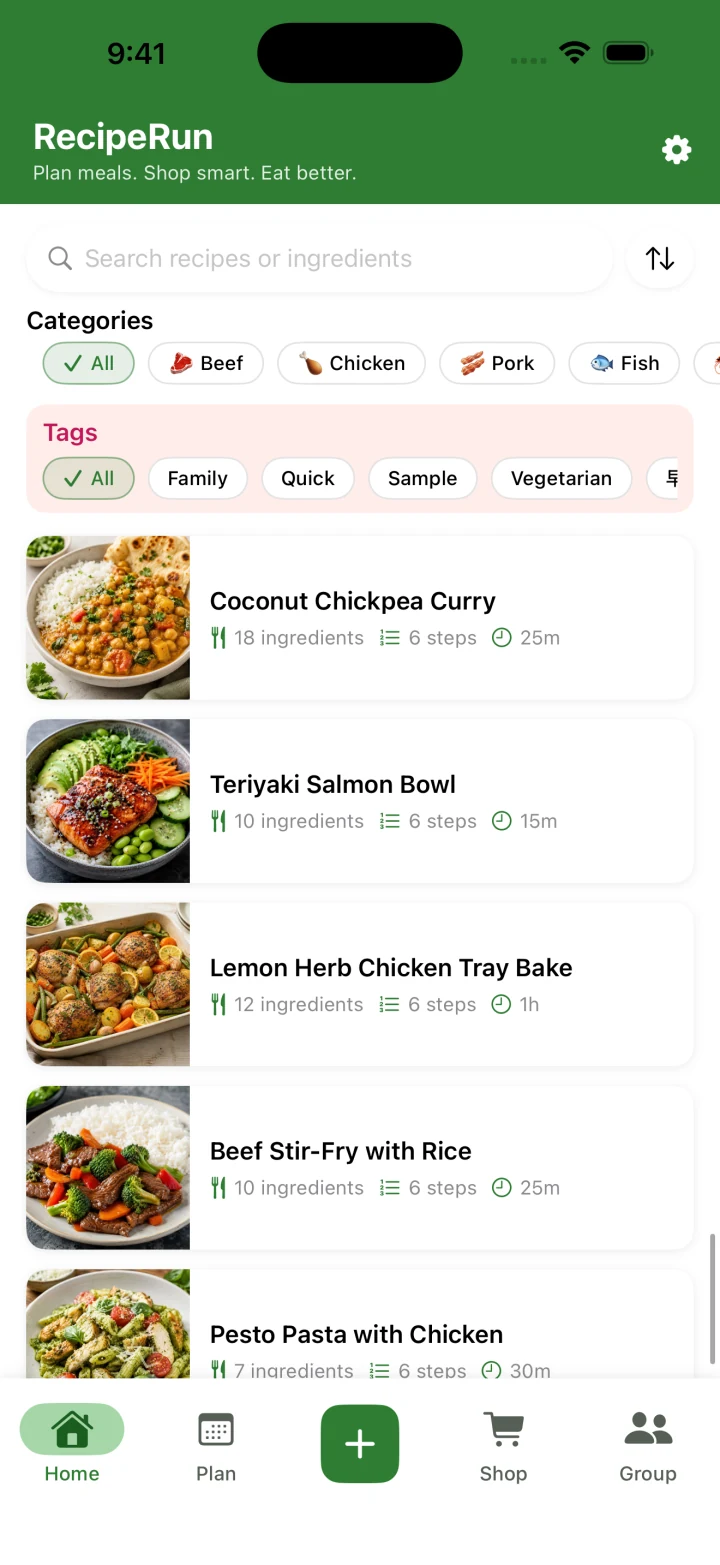
Save recipes from anywhere
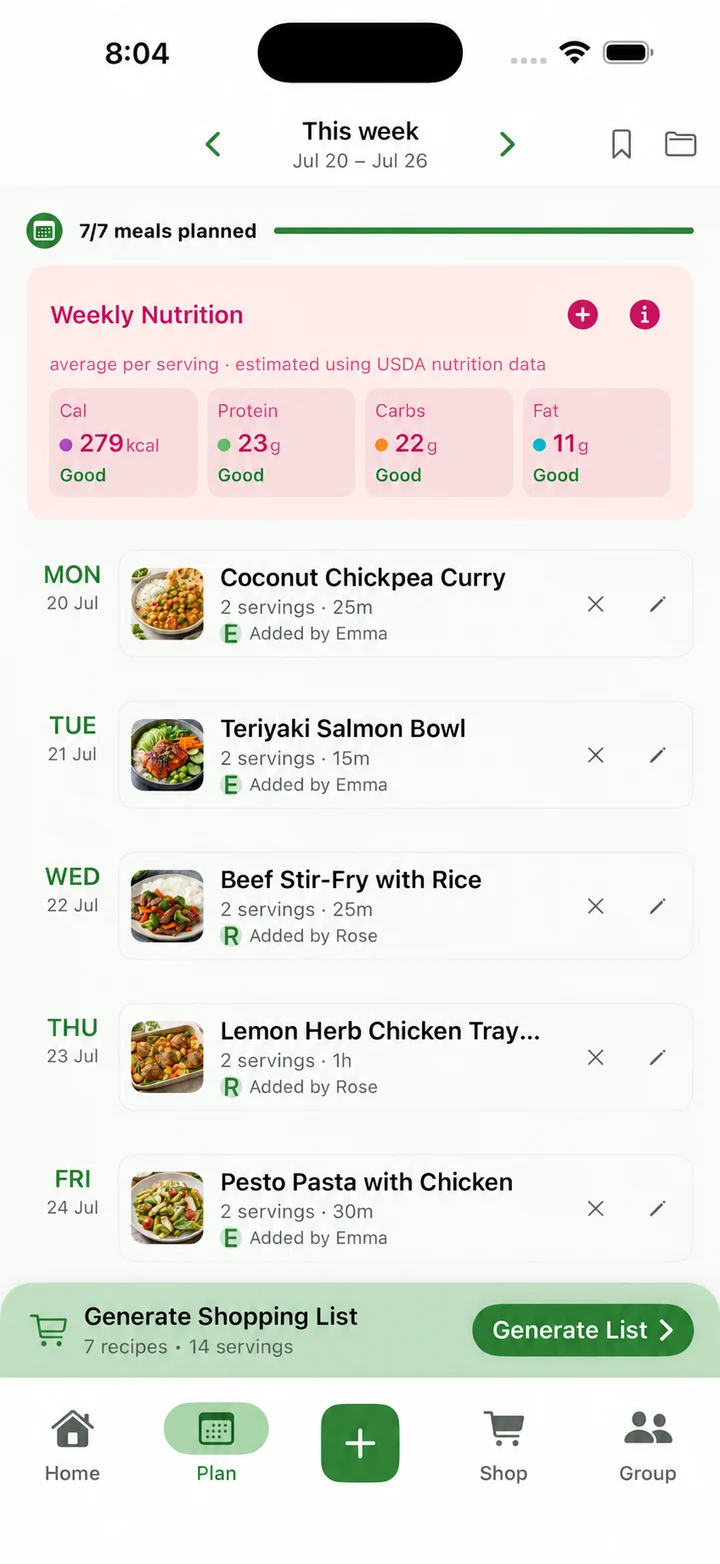
Give each one a day
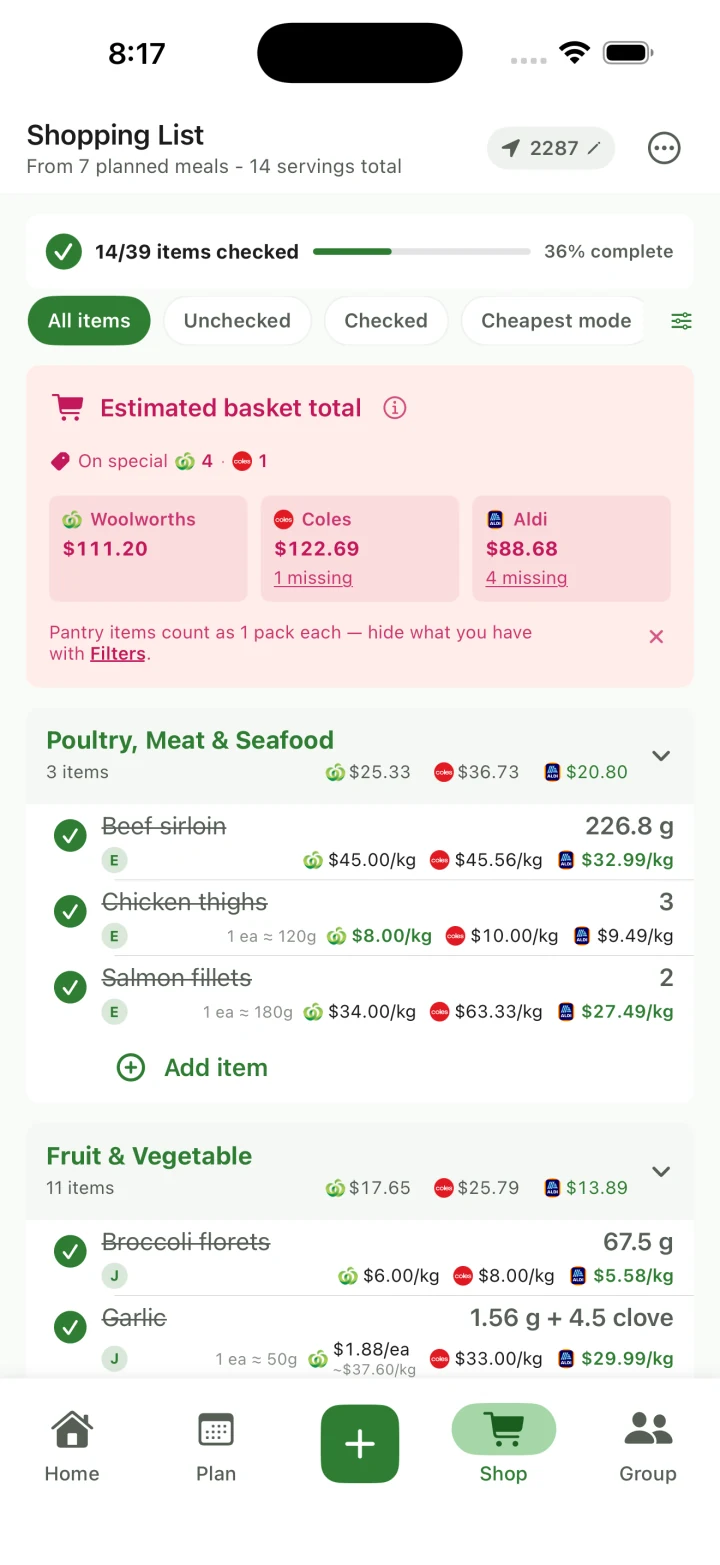
One shared list, priced at your stores
The trade-offs, plainly. RecipeRun lives on your phone, Android or iOS, with no desktop or web app. That is the device you take to the shops, but if you plan at a keyboard, Paprika or Plan to Eat will suit you better. It imports from TikTok and YouTube but not yet from Instagram, Pinterest or Facebook; a screenshot of an Instagram recipe still goes in through From Photo. And the prices are estimates. They can lag the shelf, and the app tells you when a store's total is missing items rather than hiding it. If a year of price history is what you want, that is Pinch's territory.
Pick it if: you want recipe organisation, weekly planning, a shared household list and local-store price comparison in one place, and you would rather not pay or sign up just to see whether it fits.
RecipeRun also works differently as a product. There are no third-party ads, no personal sign-up for the core features, and your recipes can stay on your own phone if you skip the optional sync and online processing. The details and the caveats are in Why RecipeRun Is Different, and before you rely on any price comparison, ours included, read how recipe ingredients get matched to supermarket products.
Paprika: the desktop workhorse
Paprika has been around a long time and it shows in the feature list: web recipe importing, grocery lists that combine matching ingredients, a pantry, weekly and monthly planning, reusable menus, serving scaling, timers and cloud sync. Everything works offline, and there are native apps for iOS, Android, macOS and Windows.
Paprika 3 is bought rather than subscribed to, and you buy each platform separately. The Android listing offers a free version capped at 50 recipes without cloud sync, with an in-app upgrade for unlimited recipes and syncing. Prices vary by platform and region. Paprika 4 has been in open beta since 28 September 2026. Its help pages describe family sharing, where everyone in the household uses the same recipe collection with their own Paprika account, and Paprika says premium features will require a subscription after the beta.
Where it beats RecipeRun: desktop apps, offline access, pantry tracking, reusable menus and a deeper set of cooking tools.
Pick it if: you like local-first software on your computer and your phone, and you don't mind paying for each version you need. If prices at your local supermarket and a shared household list matter, that is RecipeRun.
Recipe Keeper: scanning and printable family cookbooks
Recipe Keeper runs on iPhone, iPad, Android, Mac and Windows. It imports from recipe websites, Instagram and TikTok, and it scans photos, PDFs, cookbooks, magazines and handwritten recipes. You also get weekly and monthly planning, shopping lists grouped by aisle, serving adjustments and sync between devices.
Two things stand out. It can turn your collection into a formatted cookbook to print or share as a PDF, and it has an English-language Alexa skill. The Australian App Store listing shows a free download with a $29.99 Pro upgrade, notes that other platforms are bought separately and offers a shared family recipe collection. Its site also says you can share your meal plan with all your family.
Where it beats RecipeRun: PDF scanning, direct Instagram import, desktop apps, Alexa and those printable cookbooks. It is a strong choice for a family archive.
Pick it if: preserving a big family collection across phones and computers matters more to you than what the week costs at the shops.
ReciMe: for people who save recipes while scrolling
ReciMe imports from Instagram, Pinterest, TikTok, Facebook and handwritten recipes. It has cookbooks, a weekly meal plan, smart grocery lists, serving adjustments and cookbooks you can build with other people, a feature that is iOS-only for now. ReciMe Plus lists unlimited imports, scanning from cookbooks and handwritten notes, a nutrition calculator and a measurement converter among its benefits.
The free plan allows five smart imports a week plus the core planning and grocery-list features. Its price depends on the plan and region: the Australian App Store lists ReciMe Plus options from $9.99 to $79.99 without saying which is monthly or yearly. Its help centre says the meal planner is mobile-only for now, although recipes can be viewed on a computer, and that the way to share grocery lists is to log into the same account on every device.
Where it beats RecipeRun: more social sources, shared cookbooks and, with Plus, measurement conversion.
Pick it if: Instagram, Pinterest or Facebook is where your recipes come from and Australian price comparison is not a priority.
Samsung Food: discovery and nutrition
Samsung Food combines a recipe box, a community for finding recipes, a weekly planner and shopping lists you can share with family, on Android, iOS and the web, with a browser extension for saving recipes as you browse.
The optional Food+ tier adds tailored seven-day meal plans and plan templates, AI recipe personalisation, shopping and Food List tools, "Use It Up" recipe search, ingredient scanning, AI-guided recipes and unlimited recipe scans from images. Its Food+ page lists a seven-day trial and prices of $6.99 a month or $59.99 a year, noting that pricing varies by location. The Australian App Store lists Food+ at $9.99 a month or $99.99 a year.
Where it beats RecipeRun: community discovery, a web version and browser extension, nutrition tooling and a longer list of paid features.
Pick it if: finding new recipes and tracking nutrition matter at least as much as managing the recipes you already have.
Plan to Eat: for serious meal planners
Plan to Eat is built around four steps: save, organise, plan, shop. The planning calendar takes meals and notes over any date range, reusable menus let you repeat a week that worked, and the ingredients from planned recipes flow into an aisle-organised shopping list.
According to its FAQ it runs on Android, iOS and a desktop site, and its pricing page says one account can be shared with the people in your household. The site offers a 14-day trial with no card, then $5.95 a month or $49 a year, with no permanent free plan. The page doesn't name a currency, so don't assume Australian dollars; in the iPhone app, the Australian App Store lists a one-year membership at $89.99.
Where it beats RecipeRun: a mature planning calendar, reusable menus, a proper desktop experience and a workflow designed for people who plan every week.
Pick it if: planning depth and a browser version matter more than photo scanning or Australian price comparison, and you are happy to pay from the start.
Pinch: price history and Harris Farm
Pinch is the closest thing in this list to RecipeRun on prices, and it goes further on tracking. Its site describes recipe import from a URL, the share sheet or a screenshot; ingredient-to-product matching; basket comparison across Coles, Woolworths, ALDI and Harris Farm; split-shop suggestions; price-drop notifications; and 52 weeks of price history.
Pinch says it is free on iOS and Android. Its About page describes pasting a recipe or building a meal plan and comparing the ingredients at Coles, Woolworths, ALDI and Harris Farm, and its Australian App Store listing also names Umall and adds shared shopping lists.
Where it beats RecipeRun: Harris Farm, price charts going back a year and price-drop alerts. If watching price cycles is the job, Pinch is built for it.
Pick it if: you want to see price history and get alerts. Pick RecipeRun instead if you want your own recipe collection, the weekly plan and the list shared with the household, with the products you actually buy remembered from one shop to the next.
These are Pinch's own published claims. We have not audited its retailer coverage, matching accuracy, update frequency or database.
So which one?
Start from the problem you most want solved:
- Recipes to a plan to a shared list, priced at your local stores: RecipeRun.
- Offline desktop recipe management and a pantry: Paprika.
- Scanning, PDFs and printable family cookbooks: Recipe Keeper.
- Importing from Instagram, Pinterest and Facebook: ReciMe.
- Discovery, nutrition and a web version: Samsung Food.
- Detailed, reusable planning on desktop and mobile: Plan to Eat.
- Price history, alerts and Harris Farm: Pinch.
Whichever way you lean, test it on one ordinary week before paying anyone. Import three recipes from the places you really get recipes, plan the meals, generate the list, fix one awkward ingredient and take the list to the shops. You will learn more from that than from any feature checklist, including this one. RecipeRun costs nothing to try, so it is an easy place to start.
If the shared list matters more to you than the recipes, we also compare the best shopping list apps in Australia, from AnyList and WiseList to Google Keep.
Frequently asked questions
Does RecipeRun work with Australian supermarkets?
Yes. Choose your local Woolworths, Coles and ALDI by postcode and the grocery list shows an estimated total at each store, the product behind each price and any items it could not match. Prices are estimates and can differ at the checkout.
What is the best recipe manager app in Australia?
For households who want recipes, meal planning and a shared list connected to prices at their local supermarkets, RecipeRun. Other apps are stronger on desktop, social imports, discovery, scanning or price history, and the sections above say which.
Which recipe apps make a grocery list from a meal plan?
RecipeRun, Paprika, Recipe Keeper, ReciMe, Samsung Food, Plan to Eat and Pinch all do. Check quantities and pantry items on any automatic list, because they all need the occasional correction.
Which app compares Woolworths, Coles and ALDI?
RecipeRun and Pinch, in different ways. RecipeRun works from your chosen local stores, your weekly plan, Family Groups and the products you have said you normally buy. Pinch adds Harris Farm, central price history and alerts.
Does RecipeRun import from TikTok, YouTube or video files?
Yes. It takes TikTok and YouTube links and uploaded video files, as well as cooking websites, photos, screenshots and handwritten cards. Check the extracted ingredients and steps before you save.
Try RecipeRun for a real week
RecipeRun is free to download on Google Play and the App Store.
Before you decide, read the recipe manager with grocery list guide and how we compare Woolworths, Coles and ALDI prices.
Official sources
- RecipeRun features and pricing model, RecipeRun Terms and the official Google Play and App Store listings.
- Paprika features and platforms, Paprika for Android, the Paprika 4 beta announcement and Paprika 4 family sharing.
- Recipe Keeper features and platforms and its Australian App Store listing.
- ReciMe overview, free plan, regional pricing guidance, ReciMe Plus benefits, sharing an account, collaboration on iOS, the mobile meal planner and its Australian App Store listing.
- Samsung Food features and platforms, Food+ inclusions and pricing and its Australian App Store listing.
- Plan to Eat features, pricing, official FAQ and its Australian App Store listing.
- Pinch features, Pinch About and pricing page and its Australian App Store listing.
Competitor names and trademarks belong to their owners. RecipeRun is not affiliated with or endorsed by any competitor or supermarket named here.
Who wrote this, and how we checked
This article is written by the team that makes RecipeRun, so it is not an independent review. We have said so at the top, included the competitors that overlap with what RecipeRun does, and stated where another app has the clearer advantage.
We checked each provider's official website, help centre or Australian app-store listing on 13 July 2026, rechecked pricing, free-use limits and the comparison table on 13 August 2026, and rechecked every claim about them on 15 October 2026. On 3 November 2026 we rechecked the retailers Pinch names on its About page and Australian App Store listing. This is a comparison of what each provider says its app does. We have not tested every feature, device, import source or subscription ourselves, and reliability, support and day-to-day usability need longer hands-on use to judge.
Prices, trials and limits change and can differ by country, platform, tax and promotion. Check the provider's checkout before you subscribe.