
Meal planning
Best Shared Shopping and Grocery List Apps in Australia (2026)
Seven ways to share a grocery list in Australia, compared on planning, live sharing, supermarket prices, platforms, accounts and ads. Written by the RecipeRun team, with the trade-offs stated plainly.
Quick answer: if your household cooks from recipes and shops at Woolworths, Coles or ALDI, RecipeRun is the shared list to start with. It is the only app here where the list is generated from the week's recipes, shared live with everyone at home and priced at your local stores. It works across iPhone and Android in the same household, and the app is free to download, with no ads. If you only want a shared checklist, or your priorities sit elsewhere, one of these will suit you better:
- AnyList: the most polished list on its own; its recipe and meal-planning tools are limited, and sit behind a yearly subscription.
- WiseList: Australian price comparison plus pantry, bills and other household tools.
- Bring! or Listonic: fast shared lists with lighter recipe features.
- Apple Reminders or Google Keep: no extra app at all, for Apple-only or mixed-device households.
We make RecipeRun, so this is a comparison by one of the entrants, not an independent review. Each rival gets its advantages stated plainly, and how we checked is at the end.
Shared grocery list apps compared
Swipe horizontally to compare
| Option | Recipes to plan to list | Live shared list | Australian supermarket prices | Platforms | Account | Ads and privacy label |
|---|---|---|---|---|---|---|
| RecipeRun | Yes, the list is generated from the week's recipes | Yes, in a Family Group | Woolworths, Coles and ALDI at your local stores | Android and iOS; no web or desktop app | Never required; Family Group members use Sign in with Apple or Google | No ads, no tracking, ever |
| AnyList | Meal-plan calendar and plan-generated list need AnyList Complete | Yes, free | No | iPhone and Android; web and Mac with Complete | Sign-up required | Data linked to you |
| Bring! | Recipe ingredients only; no shared weekly plan found | Yes, free | No | iPhone, Android, Apple Watch and web | Registration may be needed for all features | Ads; data linked to you |
| Listonic | AI assistant drafts a week's meals and the list; no saved recipes | Yes, free | No | Android, iOS and web | None required | Ads and tracking declared |
| WiseList | Recipes and AI meal plans | Yes; inviting needs WiseList+ ($7.99 a month), joining is free | Coles, Woolworths and ALDI | iPhone and Android | Sign-up required | Ads; data linked to you |
| Apple Reminders | No | Yes, Apple devices only | No | iPhone, iPad, Mac and iCloud.com | Apple Account | Not applicable |
| Google Keep | No | Yes | No | Android, iPhone, iPad and web | Google Account | Not applicable |
The last column comes from each app's Australian App Store listing and privacy label. RecipeRun's label lists only "Data Not Linked to You": no tracking, and nothing tied to you as a person. AnyList, Bring!, Listonic and WiseList declare data linked to you. Listonic also declares data in Apple's "Data Used to Track You" category, and Bring!, Listonic and WiseList are marked as containing advertising. Our privacy policy has the detail. Checked 15 October 2026; prices and terms change.
RecipeRun: the list is the last step of the plan, and everyone can see it
Most shared list apps start with an empty list. RecipeRun starts a step earlier. You save the recipes your household actually cooks, give each one a day in the week, and the week's ingredients become one grocery list. In a Family Group every member sees the same recipes, plan and list on their own phone. When someone ticks off the salmon in the store, it is ticked for everyone. And you never have to create an account: the app works indefinitely without one. Sharing uses Sign in with Apple or Google, because the rest of the household has to be able to find you, and even then no RecipeRun account creation is required.
Then the Australian part. Choose your local Woolworths, Coles and ALDI by postcode and the list shows an estimated total at each store, the product behind every price, and a count of anything it could not match, so the gaps are visible rather than hidden. Tell it which brand or pack you normally buy and later comparisons use that.
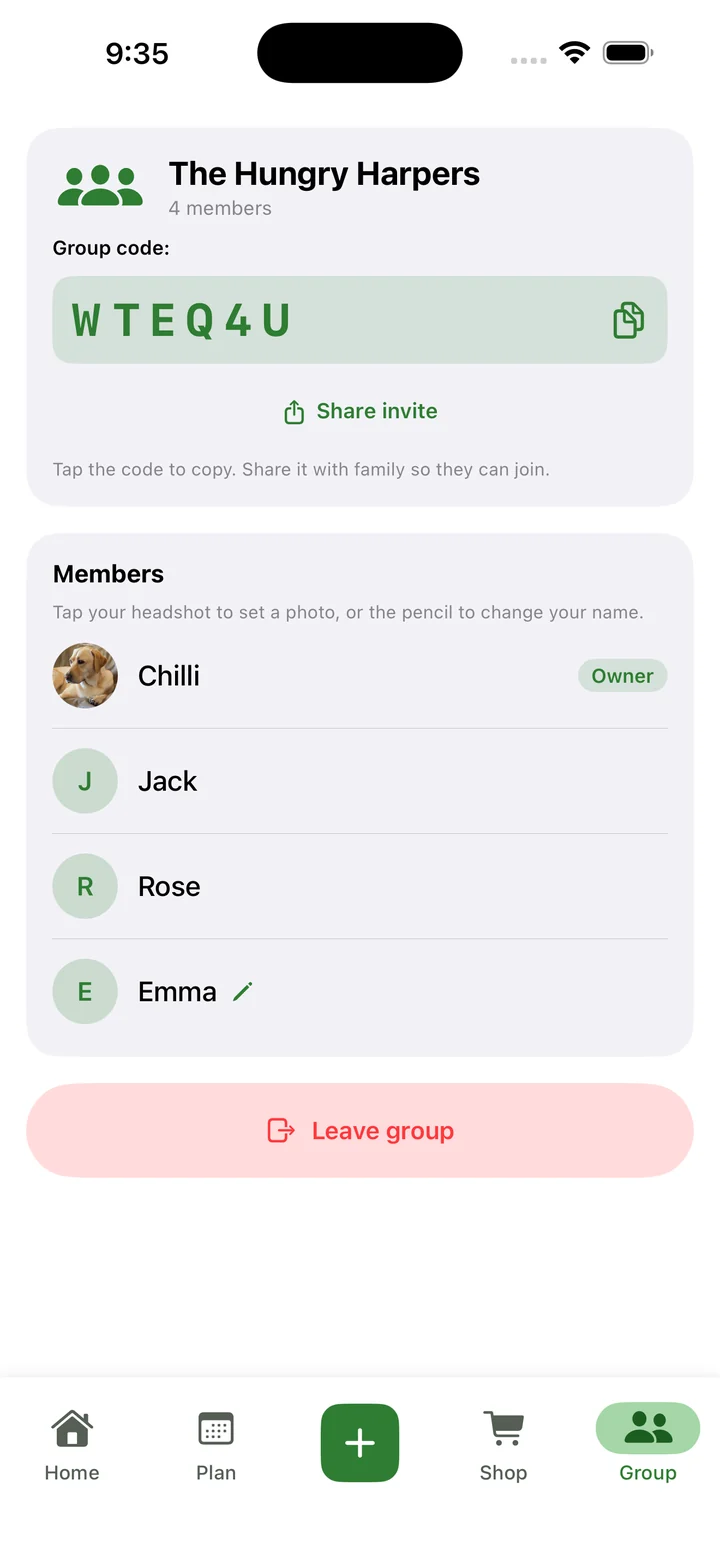
One household, four accounts
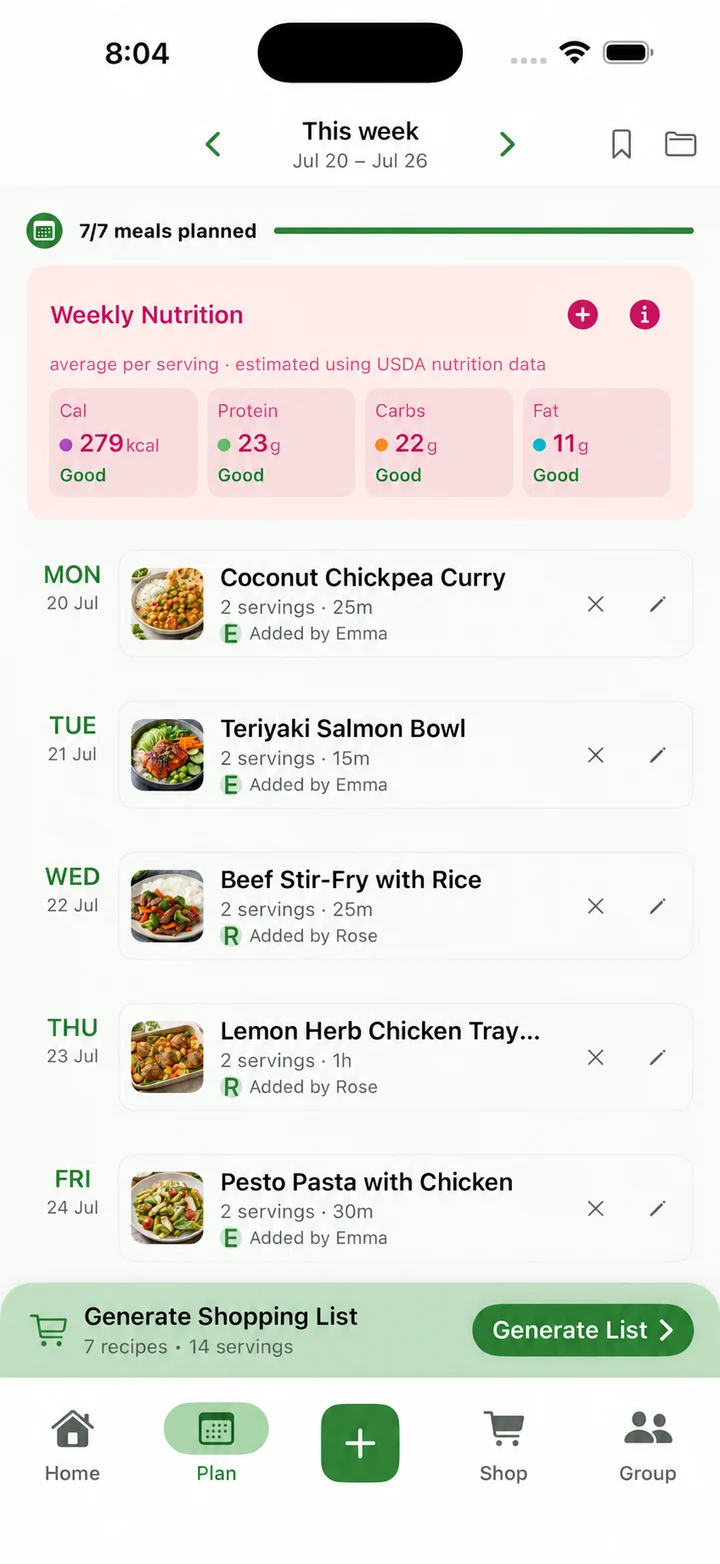
Everyone has a say on what we eat
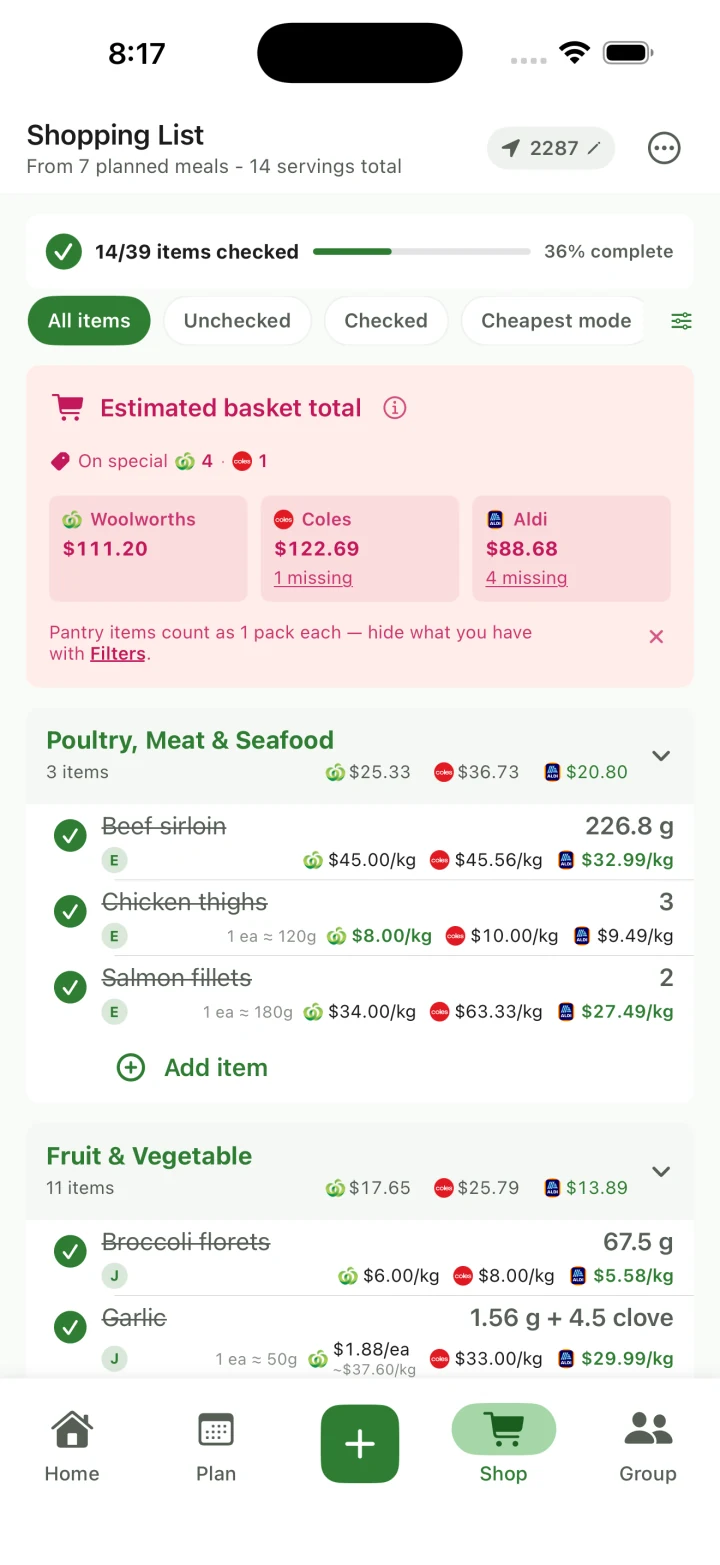
One list, ticked off together and priced
The trade-offs, plainly. If all you want is a shared checklist, AnyList, Bring! and Listonic do that for nothing. RecipeRun is phone-only, Android and iOS, with no desktop or web app; that is the device you shop with, but if you plan at a keyboard, AnyList Complete or Listonic's web version will suit you better. And prices are estimates that can lag the shelf, which is why the app shows you what is missing from a store's total instead of pretending the total is complete.
Pick it if: recipes drive your shopping, you want the plan and the list shared across the household, and knowing what the week will roughly cost at your local stores would change where you shop.
If sharing is the feature that matters most to you, the shared family grocery list page explains how Family Groups work, and the family meal planner page covers the planning behind the list. For the recipe side, we also compare the recipe manager apps available in Australia.
AnyList: the polished list-first choice
AnyList has spent years refining the list itself: free sharing, autocomplete, automatic grocery categories, quantities, notes, custom store layouts and voice entry. Changes to a shared list appear for everyone straight away.
Recipes and meal planning sit behind AnyList Complete. The paid tier adds unlimited recipe web imports, a shared meal-planning calendar, a grocery list generated from a chosen date range, item photos, more store filters and web and Mac access. The free tier includes recipe organisation and up to five website imports, but the planning calendar and the plan-generated list are Complete features. On the day we checked, the Australian App Store listed Complete at A$14.99 a year for one person and A$22.99 a year for a household.
Where it beats RecipeRun: the list tools are deeper, sharing is free, and Complete gives you web and Mac access.
Pick it if: you want the best possible list first and are happy to pay yearly for planning. AnyList Complete lets you type in prices by hand, but we found nothing on its pages about live Woolworths, Coles and ALDI matching; if that matters, RecipeRun or WiseList. Weighing AnyList against RecipeRun? See AnyList vs RecipeRun for Australian households.
WiseList: Australian prices plus the rest of the household admin
WiseList compares Coles, Woolworths and ALDI, updates shared lists in real time, and its WiseList+ Split by Store feature sends each item to whichever store is cheaper. Its page is upfront that each store's total includes only the items that store can price. It also has saved recipes, web and social recipe saving, pantry and fridge tools, and several meal-planning modes based on what you have, what is on special, a budget or a diet.
Its pages are not consistent about sharing. Its collaborative-list page says the core shared list is free, while its Australian App Store description says inviting people needs WiseList+ and joining is free. The listing shows WiseList+ at $7.99 a month or $49.99 a year. Confirm the current gate in the app before subscribing for sharing.
Where it beats RecipeRun: pantry tracking and the broader bills-and-household tools.
Pick it if: you want one app for the shopping and the rest of the household admin. RecipeRun is the narrower tool: your own recipe collection, a shared weekly plan, your chosen local stores and the products you actually buy remembered from one shop to the next.
Weighing WiseList against other Australian price apps, or mainly trying to decide which supermarket to use each week? See WiseList alternatives in Australia and which of ALDI, Coles and Woolworths is cheapest.
Bring!: fast, visual, and good with voice
Bring! is a quick visual list with real-time changes, photos and details on items, custom sorting, urgency labels and notifications when someone adds something. It works with Siri and Alexa, and its Australian listing says it runs on smartphones, tablets and Apple Watch and as a web version.
It publishes seasonal recipe ideas, saves recipes from the internet and can drop a recipe's ingredients onto a list. Its English pages talk about planning shopping and meals, but we did not find a shared weekly meal calendar like RecipeRun's or AnyList's. Bring! says core sharing, recipes and offers are free, and its terms say registering an account may be necessary to use all features. Its Australian listing marks the app as containing advertising and lists Bring! Premium at $2.99 a month or $14.99 a year. Its local brochures and offers are a different thing from pricing a matched basket across supermarkets.
Where it beats RecipeRun: speed, voice entry, notifications and free sharing.
Pick it if: you want the fastest shared list and recipes are an occasional extra rather than the starting point.
Listonic: a free specialist list on every platform
Listonic offers unlimited free lists and sharing, real-time updates, aisle or alphabetical sorting, voice input, notes, photos and a running cost total. It runs on Android, iOS and the web, and lists keep working offline and sync when you reconnect. Its AI assistant, in the Android and iPhone apps, can now plan a week of meals and hand you the grocery list for it, but its pages describe no saved recipe library or shared weekly plan.
Core features are free. Premium adds themes and removes ads, and the Australian App Store shows advertising and several in-app purchases, so check the current offer in the app. Its budget total uses prices you enter yourself; it is not a live Australian retailer comparison.
Where it beats RecipeRun: free sharing, a web version and manual budget tracking.
Pick it if: you need a dedicated shared list on mixed devices and a browser, and you are happy to write the list yourself.
Apple Reminders: the built-in option for an all-Apple home
Apple Reminders sorts a grocery list into categories such as produce and seafood on its own. Share an iCloud list and other Apple Account holders can add, edit and tick items, see each other's changes and get activity notifications, on iPhone, iPad, Mac and iCloud.com.
Pick it if: everyone at home has an iPhone and you want a shared list without installing anything.
Trade-off: everyone needs iCloud Reminders, an Android phone in the house breaks it, and there is no recipe library, meal plan or supermarket comparison behind the list.
Google Keep: the simplest checklist for mixed devices
Google Keep does checklists with collaborators across Android, iPhone, iPad and the web, and Google's own listing describes sharing a shopping list and watching items get ticked off in real time.
Pick it if: you already live in Google accounts and want the lightest possible shared list across phones and a browser.
Trade-off: Keep is a notes app. No grocery categories, no recipes, no meal plan, no prices. It removes almost none of the work between choosing what to cook and writing the list.
Which option fits which household?
- Recipes, a shared weekly plan and prices at your local stores: RecipeRun.
- The best pure list, with limited, paid planning and web access: AnyList.
- Australian price comparison plus pantry and household tools: WiseList.
- A quick visual list with voice and notifications: Bring!
- A free specialist list with a web version: Listonic.
- An all-Apple household that wants nothing new: Apple Reminders.
- A basic checklist across mixed devices: Google Keep.
If the plan matters as much as the list, run one real week through your shortlist rather than counting features. Save three recipes, move one meal after the list is generated, add a household item by hand, and let two people tick things off during the shop. RecipeRun costs nothing to try, so it is an easy place to begin. The shared family meal-planning guide has a fuller test routine.
Frequently asked questions
What is the best shared grocery list app for Australian families?
For families who cook from recipes and shop at Woolworths, Coles or ALDI, RecipeRun, because the list, the plan and the prices are connected. AnyList is the strongest list-first alternative, WiseList the broader household organiser, and Bring! and Listonic the quick shared lists. We make RecipeRun, so weigh that recommendation accordingly.
Is there a free shared grocery list app?
Yes. AnyList, Bring!, Listonic, Apple Reminders and Google Keep all share lists without a subscription, subject to their account and platform rules. WiseList's Australian listing says inviting people needs WiseList+, although its collaborative-list page says the core shared list is free, so check in the app.
Which grocery list apps work on both iPhone and Android?
RecipeRun, AnyList, Bring!, Listonic, WiseList and Google Keep. Apple Reminders has no Android app.
Can two people tick off items at the same time?
Yes, in all of them: RecipeRun Family Groups, AnyList, Bring!, Listonic, WiseList, Apple Reminders and Google Keep all sync collaborative changes. How instant it feels depends on connectivity and on everyone actually using the shared list.
Which app turns a family meal plan into a grocery list?
RecipeRun generates the list from the recipes on its weekly plan and shares both through Family Groups. AnyList Complete has a planning calendar that generates a list for a date range. WiseList connects saved recipes and AI meal plans to shopping. Bring! adds a recipe's ingredients to a list, and Listonic's AI assistant can plan a week of meals and write the list for it. For a repeatable method, see the weekly meal-planning and grocery-list guide.
Which apps compare Woolworths, Coles and ALDI prices?
RecipeRun and WiseList. RecipeRun works from your chosen local stores, your recipes and plan, and the products you have said you buy. WiseList adds its pantry and household tools. Both show estimates, so match products and pack sizes carefully and confirm the shelf price. See how to compare Woolworths, Coles and ALDI fairly.
Do Apple Reminders or Google Keep replace a meal-planning app?
If a shared checklist is all you need, yes. Neither has a recipe library, a weekly plan that writes the list, or supermarket prices, so the more your shopping is driven by recipes, the more copying they leave you to do.
Try the workflow on one real week
Choose the app that removes the most repeated work from your household, not the one with the longest feature page. RecipeRun is free to download on Google Play and the App Store.
The family grocery list, family meal planner and recipe manager pages show each part of the workflow in more detail.
Official sources
- RecipeRun family grocery list, family meal planner, recipe manager, Privacy Policy, account and no-ads explanation and Terms.
- AnyList feature and plan comparison, account setup, household recipe and meal-plan sharing, item prices, privacy policy and Australian App Store listing.
- Bring! features, official overview, privacy policy, terms of use and Australian App Store listing.
- Listonic features and account-free core use, sharing options, AI assistant, privacy policy and Australian App Store listing.
- WiseList grocery-list and price-comparison features, collaborative-list page, Split by Store, account terms and Australian App Store listing.
- Apple Support on grocery lists, sharing and collaboration and iCloud.com access, plus the Australian App Store listing.
- Google Help on using Keep, making a list, sharing with collaborators and Keep privacy, plus the Australian App Store listing.
Competitor names and trademarks belong to their owners. RecipeRun is not affiliated with or endorsed by any competitor or supermarket named here.
Who wrote this, and how we checked
This comparison is written by the team that makes RecipeRun. It is not an independent review, and RecipeRun benefits if you download or subscribe. We have said so at the top, avoided a numerical ranking, included products with clear advantages over RecipeRun, linked to each provider's own pages and named the paid limits. The outbound links are plain source links, not affiliate links.
We checked each provider's official pages and Australian App Store listings on 11 August 2026 and rechecked every claim on 15 October 2026. On 3 November 2026 we rechecked WiseList's pages and Australian App Store listing, and checked the new platforms column against AnyList's, Bring!'s, Listonic's and WiseList's websites and Australian App Store listings and Apple's and Google's help pages for Reminders and Keep. Everything else is as of the 15 October check. Prices, free-use limits and sharing rules change and can differ by platform, tax and promotion. Check the provider's current terms before you subscribe.