
Meal planning
Shared Meal Planning and Grocery Lists for Australian Families
A practical household workflow for agreeing on meals, sharing the resulting list and checking items off together.
Quick answer: A shared family meal-planning system works best when everyone can see the same weekly plan and grocery list, one person confirms the plan before shopping, and list changes are visible to the whole household. RecipeRun Family Groups let members share recipes, a weekly meal plan and a grocery list, with list check-offs syncing in real time.
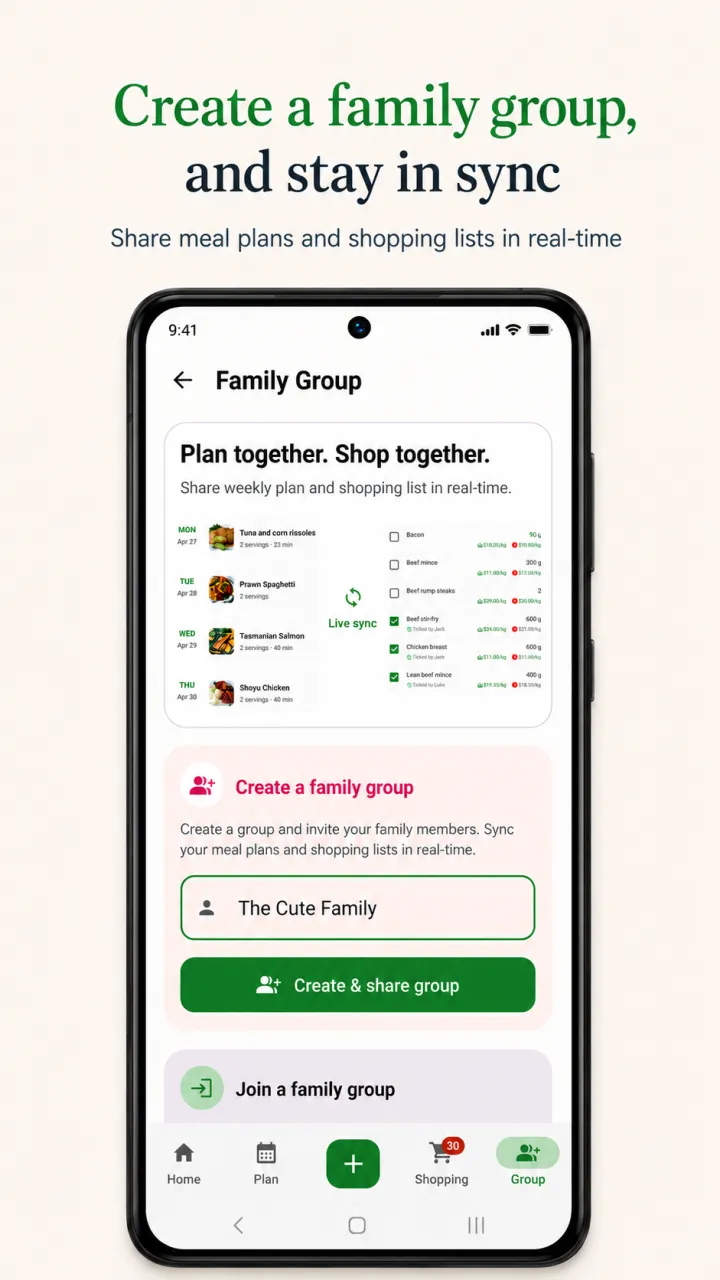
See how RecipeRun handles the connected family meal planner and shared family grocery list.
The technology is only half of the system. A useful shared plan also needs clear responsibilities, a realistic week and a simple rule for last-minute changes. This guide shows a repeatable approach for couples, families and housemates.
What should a shared family meal planner include?
A practical shared meal planner should answer four questions without a group-chat search:
- What are we eating, and on which day?
- Which recipe are we using?
- What still needs to be bought?
- Has somebody already picked that item up?
Keeping these answers together reduces the chance that one person plans from an old list while another shops from a newer one. It also makes the plan useful to someone who did not create it.
A simple weekly family planning routine
1. Check the week before choosing meals
Start with the calendar, not the recipe collection. Mark late workdays, sport, appointments, visitors and nights when someone will be away. A quick meal belongs on the busiest night; a new or time-consuming recipe belongs where there is enough time to cook it.
You do not have to plan every meal. Planning three or four dinners can be more useful than creating a seven-night plan nobody follows.
2. Check the fridge, freezer and pantry
Look for food that should shape the plan: vegetables that need using, an open packet, frozen portions and staples you already have. RecipeRun can build a list from planned recipes, but it cannot see what is physically in your kitchen. A household member still needs to remove or mark items that are already available.
3. Let each person contribute
Ask household members for one meal request or one constraint. That can be a favourite meal, a late night, a dietary requirement or a request to use something already open. The planner then makes the final week coherent rather than treating every suggestion as an extra meal.
For allergies or medical dietary needs, check every recipe and product label yourself. A shared planning app does not replace individual dietary advice or allergen verification.
4. Confirm recipes and servings
Choose the actual recipe, not only a meal name. “Curry” is too vague to produce a reliable shopping list. Confirm which curry, how many people will eat it and whether you want leftovers.
If a saved recipe was extracted from a photo or handwritten card, review its ingredients and instructions before adding it to the plan. Automated extraction can make mistakes.
5. Generate and review one grocery list
Once the recipes and servings are settled, build the list. Combine repeated ingredients, check quantities and remove pantry items. Keep household supplies or unplanned groceries on that same list so the shopper has one source of truth.
RecipeRun turns recipes on the weekly plan into a grocery list and avoids double-ups. It updates the list when the meal plan changes, but the household should still review ingredient matches, quantities and products before shopping.
6. Assign the hand-off
Agree who will do each part of the week:
- Planner: confirms meals, recipes and servings.
- Checker: reviews the kitchen and removes items already at home.
- Shopper: checks products, quantities and final prices at the retailer.
- Cook: flags substitutions or leftovers that change a later meal.
These can all be the same person. Naming the hand-off simply prevents everyone from assuming somebody else checked it.
An example shared week
This example is about coordination, not nutrition or a prescribed menu. Adapt it for your household, dietary needs and schedule.
Swipe horizontally to compare
| Day | Household situation | Planning choice | Who needs to act |
|---|---|---|---|
| Monday | Normal evening | Familiar pasta recipe | Planner confirms servings |
| Tuesday | Sport finishes late | Freezer meal and vegetables | Checker confirms a frozen portion exists |
| Wednesday | Everyone home | Stir-fry using vegetables already open | Cook checks what needs using first |
| Thursday | One person away | Leftovers | Planner reduces planned servings |
| Friday | Uncertain finish time | Flexible tacos or wraps | Shopper avoids highly perishable extras |
| Saturday | More cooking time | New saved recipe | Cook reviews the recipe in advance |
| Sunday | Plan next week | Soup, curry or tray bake with useful leftovers | Household reviews the remaining food |
The important part is not the particular meals. It is that each meal reflects the real week and has enough information for another person to shop or cook it.
How RecipeRun Family Groups work
RecipeRun's Family Groups are designed for a household that wants its planning information connected rather than copied between accounts.
- Create a Family Group and invite household members with a six-character code.
- Share saved recipes, the weekly meal plan and grocery list.
- Let members check and uncheck shopping-list items, with those changes syncing in real time.
- Change the weekly plan and review the updated grocery list rather than maintaining separate versions.
Recipe management, meal planning and grocery lists work worldwide; indicative Woolworths, Coles and ALDI price comparison is currently for Australian households. Price and availability information can be cached, incomplete or different at checkout, so the shopper must confirm the retailer's final product and price.
Read more about RecipeRun's recipe manager and automatic grocery-list features, or use the complete weekly meal-planning workflow. If you are still choosing an app, we compare seven shared shopping list apps in Australia, RecipeRun included.
Common shared-list problems
Two people buy the same item
Use one live list and check an item off as it goes into the trolley, not after arriving home. Real-time check-off helps, but it still depends on each shopper using the shared list.
Nobody knows which product was intended
Make vague list items more specific where the distinction matters. “Milk” may be enough for one household; another may need the quantity, type and preferred product. For Australian grocery comparison, RecipeRun can remember a preferred product selected for a grocery item, helping future comparisons reflect the item the household normally buys.
The meal plan changes after shopping
Move a perishable ingredient into another meal first, freeze it safely if appropriate, or reschedule the original recipe. Do not silently delete the meal and forget what was bought for it.
The list contains items already at home
Make the kitchen check a named step before the shopping hand-off. A generated list knows what the recipes request; it does not automatically know the contents or condition of your fridge and pantry.
One person becomes the household administrator
Keep the routine short and rotate contributions. A shared tool should make the plan visible to everyone, but it cannot by itself distribute cooking, checking or shopping work fairly.
Frequently asked questions
Can families share a meal plan and grocery list in RecipeRun?
Yes. Family Groups let household members share recipes, a weekly meal plan and a grocery list. Shopping-list changes sync in real time across the group.
Can two people use the grocery list at the same time?
Family Group members can check and uncheck items and see those list changes in real time. Each person still needs a working connection and must use the shared list consistently.
Does RecipeRun know what is already in my pantry?
No. Check your fridge, freezer and pantry, then review the generated grocery list and remove anything you already have.
Is RecipeRun only for Australian families?
No. Recipe organisation, meal planning, automatic grocery lists and Family Groups work worldwide. Supermarket price comparison across Woolworths, Coles and ALDI is currently available in Australia.
Does a shared meal planner choose meals for my family?
No. RecipeRun organises the recipes and meals you choose. Your household remains responsible for dietary suitability, allergen checks, serving amounts and food safety.
Start one shared plan
Begin with the next three dinners, not a perfect month. Save the recipes, agree on servings, generate one list and nominate who will check the kitchen before the shop.
RecipeRun is free to download on Google Play and the App Store.
Disclosure
This guide is published by the team that makes RecipeRun. Feature availability can change, so check the current app listing.