Meal planning
Meal Planning With Gemini: Connect RecipeRun and Plan From Your Own Recipes
Add RecipeRun to Gemini’s Connected Apps, which we’ve done from Australia, type @ to pick it in a chat, and Gemini plans the week from your saved recipes.
Quick answer: Gemini can plan a week of dinners and write the shopping list in any chat. Tell it about your week, ask for the dinners first, then ask for the list in its own message. Our ChatGPT meal planning guide has prompts that work the same way in Gemini. To have Gemini plan from the recipes you actually cook, add RecipeRun as a custom app in Gemini's Connected Apps. We've done that from Australia, even though Google's help page lists the US. Then type @ in a chat, pick RecipeRun and ask, "Plan next week's meals from my recipes." Google says Gemini asks you to confirm before it changes anything, and the plan and the shopping list end up in the RecipeRun app, ready to tick off at the supermarket.
What connecting adds to Gemini
On its own, Gemini only knows what you type or upload. It can suggest five quick dinners or scale a recipe, but it can't see the recipes your family already likes, and its shopping list stays in the chat.
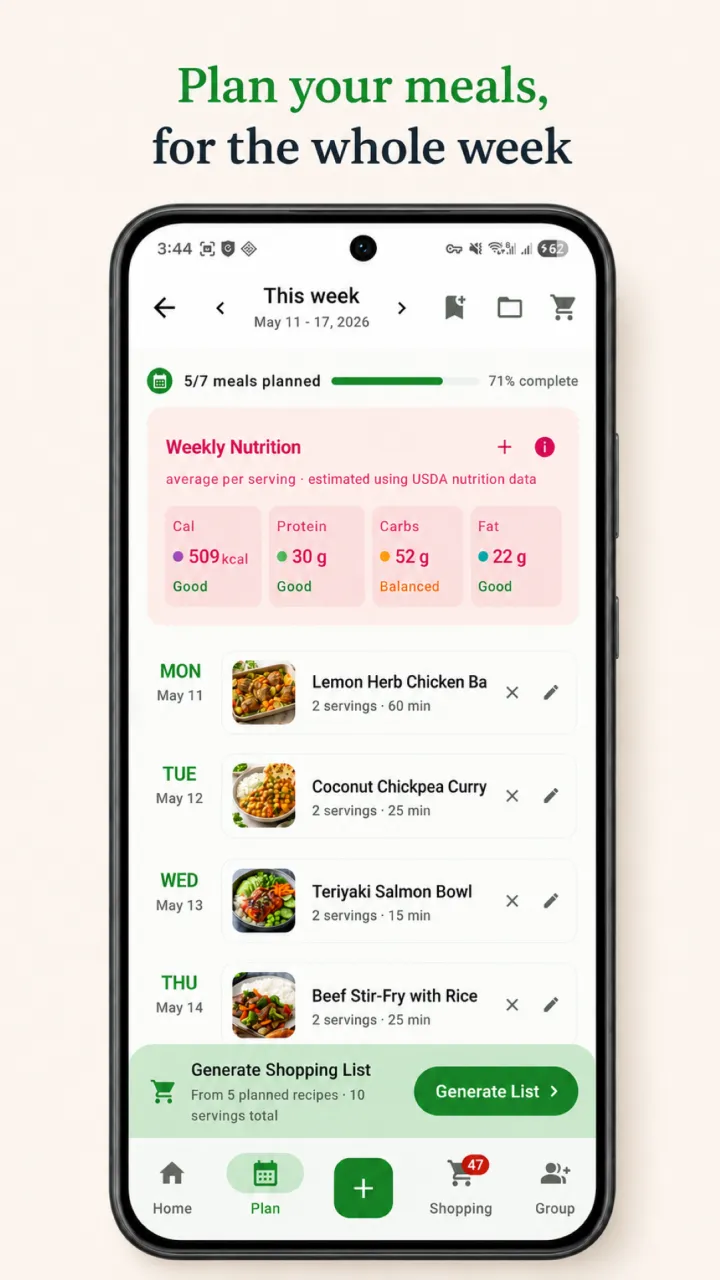
Connected to RecipeRun, Gemini can read the recipes you've saved, your weekly meal plan and your shopping list, and change them once you confirm. The changes show in the RecipeRun app once your phone is online. In a Family Group, Gemini works on the family's shared meal plan and shopping list, so everyone sees the same week.
We make RecipeRun, so the rest of this guide is about our own app.
How to add RecipeRun to Gemini
Before you start
- In RecipeRun: on iPhone, iPad or Mac, open Settings → Account, sign in with Apple and turn on Allow AI access. The Android app can't turn on AI access yet. Our AI assistants page lists everything you need on the RecipeRun side.
- In Gemini: on 13 November 2026, Google's help page listed these requirements for custom apps: being 18 or over and in the US, a personal Google Account rather than a work or school one, Gemini in English, and Keep Activity turned on. We've connected RecipeRun to Gemini from Australia all the same. If Custom apps doesn't appear in your Gemini settings, check the other requirements on Google's page.
On the web at gemini.google.com
- Click Settings → Connected Apps at the bottom. If you don't see Connected Apps, open Personal Intelligence → Connected Apps first.
- Under Custom apps, paste https://mcp.reciperun.com.au/mcp into the link field. If you've already added a custom app, click Add a custom app first.
- Click Next. When the RecipeRun sign-in page opens, use the same Apple or Google account as in the app, read the terms and choose Accept and connect.
- If Gemini asks for an OAuth client ID, enter reciperun-google and leave the secret blank.
Then, in any chat
- Type @ and choose RecipeRun, so Gemini uses it for that request.
- You add custom apps only on the web, but once RecipeRun is connected it works in the Gemini mobile app too.
A week planned with Gemini
Here's how a Sunday might go, using the requests from our AI assistants page:
- "@RecipeRun What's on my meal plan this week?" Gemini reads the plan and tells you what's there.
- "@RecipeRun Plan next week's meals from my recipes." Add whatever matters, such as nothing over 30 minutes on Monday. Gemini shows the change and asks you to confirm it.
- "@RecipeRun Make my shopping list from this week's plan." The list goes into the app, with repeated ingredients combined.
- "@RecipeRun Here's a photo of my pantry. Add these to my shopping filters so my recipes don't put them on my list." Snap the shelf and attach the photo.
- "@RecipeRun Save this recipe to RecipeRun," with a link, a photo or the recipe's text, for the dinner someone sent you.
Gemini plans from the recipes you've saved, so a new account starts with nothing to plan from. Save the dinners you cook most first.
Keeping control
- Confirmations: Google's help page says Gemini currently asks you to confirm any write action. Read what it's about to change before you confirm.
- What Gemini passes along: Google also says that when you use a custom app, Gemini may share information from your chat and from other sources it can use, such as your other Connected Apps, with that app. Keep requests that use RecipeRun about your recipes, plan and list.
- What RecipeRun shares: what Gemini reads from RecipeRun goes to Google, under Google's terms and your Gemini settings, which may involve processing outside Australia. Section 11 of our Privacy Policy has the details, and you sign in to RecipeRun in your browser, so Gemini never gets your Apple or Google password.
- Mistakes: AI can make mistakes, so check ingredients, quantities and allergens.
- Disconnecting: in Gemini, go to Settings → Connected Apps and, under Custom apps, turn RecipeRun off. To unlink or remove it, choose More details and then Disconnect or Remove app. You can also disconnect Gemini in RecipeRun's Settings → Account, or turn off Allow AI access there.
Frequently asked questions
Can Gemini make a meal plan and a shopping list?
Yes, in any chat: ask for the week's dinners first, then for one shopping list with repeated ingredients combined. With RecipeRun connected, Gemini plans from your saved recipes and puts the list in the app instead of the chat.
Can I connect Gemini to RecipeRun in Australia?
We have. Google's help page still lists custom apps for the US, but we've connected RecipeRun to Gemini from Australia. Google's other requirements are 18 or over, a personal Google Account rather than a work or school one, Gemini in English and Keep Activity on. Connected Apps can sit under Personal Intelligence in Gemini's settings, and you can add custom apps only on the web.
How do I make Gemini use RecipeRun?
Type @ in the message box and choose RecipeRun, then ask your question. That tells Gemini to use RecipeRun for that request.
Does RecipeRun work in the Gemini mobile app?
Yes, once you've connected it on the web at gemini.google.com. You can't add a custom app from the phone.
Sources
- Gemini Apps Help: Connect and manage custom apps for Gemini Apps.
- RecipeRun AI assistants, our setup notes for AI apps and Privacy Policy.
Gemini and Google are trademarks of Google. RecipeRun is not affiliated with or endorsed by Google.
Who wrote this, and how we checked
The RecipeRun team wrote this guide, and we benefit if you use RecipeRun. On 13 November 2026 we read Google's help page on custom apps, and Gemini's menus and requirements above are what it said that day. We've connected RecipeRun to Gemini ourselves, from Australia. The RecipeRun steps come from our own setup notes for AI apps. Gemini's menus change from time to time, so if a step doesn't match what you see, check Google's help page.