Meal planning
Meal Planning With Grok: Add RecipeRun as a Custom Connector
Add RecipeRun at grok.com/connectors and Grok plans the week from your saved recipes and builds the shopping list in the app. Grok Bot users can add our shared bot.
Quick answer: Grok can plan a week of dinners and write the shopping list in any chat. Describe your week, ask for the dinners first, then ask for the list in its own message. Our ChatGPT meal planning guide has prompts that work the same way in Grok. To have Grok plan from the recipes you actually cook, add RecipeRun as a custom connector at grok.com/connectors. Then ask Grok to plan next week's meals from your recipes, and the plan and the shopping list show up in the RecipeRun app, ready to tick off at the supermarket. If you use Grok Bot instead, you can add our shared RecipeRun bot.
What a connector changes
A plain Grok chat can't see your recipe collection, so it suggests dishes in general and leaves the shopping list as text. A connector gives Grok tools it can use in your conversations. xAI says that when you add a custom connector, Grok discovers the tools the server offers and makes them available, just like its built-in connectors.
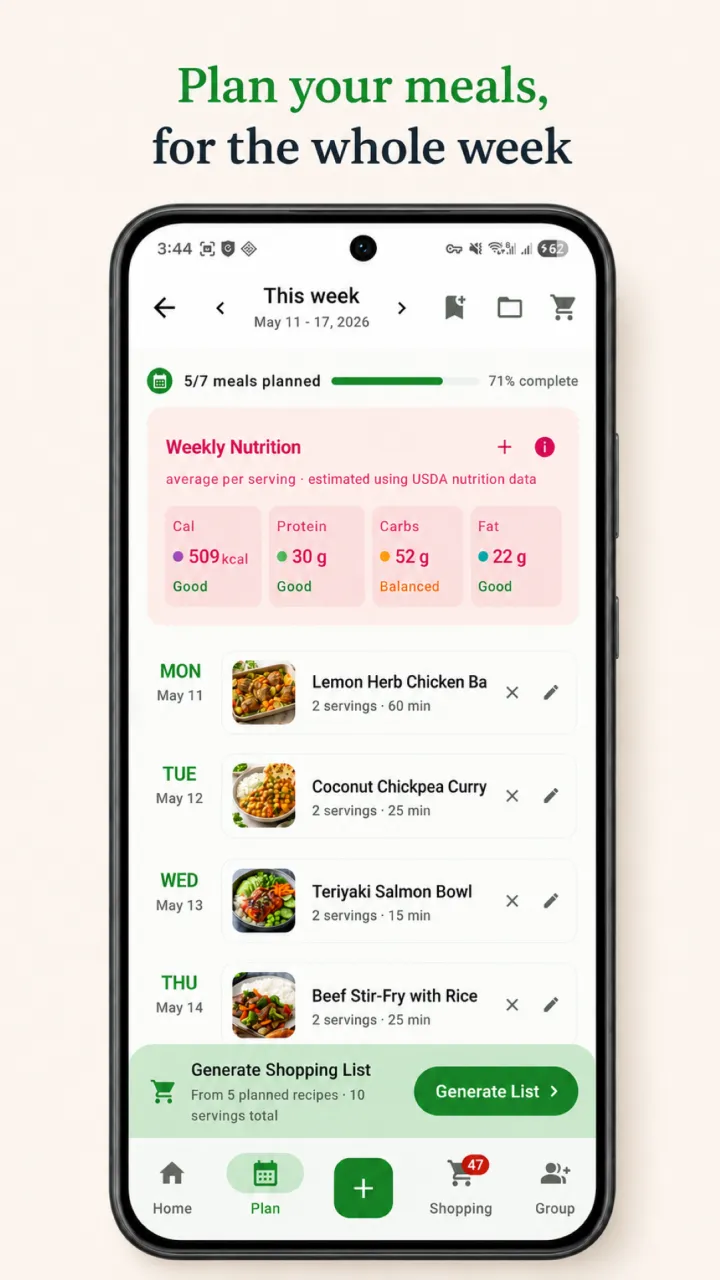
With RecipeRun connected, those tools let Grok read the recipes you've saved, your weekly meal plan and your shopping list, and change them when you ask. The changes show in the RecipeRun app once your phone is online. In a Family Group, Grok works on the family's shared meal plan and shopping list.
We make RecipeRun, so the rest of this guide is about our own app.
How to add RecipeRun to Grok
First, in the RecipeRun app
- On iPhone, iPad or Mac, open Settings → Account, sign in with Apple and turn on Allow AI access. The Android app can't turn on AI access yet.
- Our AI assistants page lists everything you need on the RecipeRun side.
Then, on grok.com
- Go to grok.com/connectors, click New Connector, then choose Custom.
- Paste https://mcp.reciperun.com.au/mcp. When the RecipeRun sign-in page opens, use the same Apple or Google account as in the app, read the terms and choose Accept and connect.
- If Grok shows a form instead of a sign-in page, enter the client ID reciperun-xai with no client secret, choose the token auth method none (PKCE only), and keep the endpoints and scopes Grok found.
- On Grok Business and Enterprise, a team admin has to add the connector in xAI's cloud console before members can use it.
Then, just ask
Once it's connected, ask about your recipes, plan or list in a Grok chat, and Grok can use RecipeRun's tools to answer.
Using Grok Bot instead
Grok Bot is a separate app from xAI for bots that keep working for you. If you use it, add our shared RecipeRun bot.
What to ask Grok
Grok can work on your recipes as well as your week. These requests come from our AI assistants page:
- "What can I cook with chicken and rice from my recipes?"
- "Save this recipe to RecipeRun," with a link, a photo or the recipe's text.
- "Change my pancake recipe to use oat milk."
- "Plan next week's meals from my recipes."
- "Make my shopping list from this week's plan."
Grok plans from the recipes you've saved, so start by saving the dinners you cook most, in the app or by sharing their links with Grok.
Before you connect
- What's shared: what Grok reads from RecipeRun goes to xAI, which makes Grok, under xAI's terms and your Grok settings, which may involve processing outside Australia. Section 11 of our Privacy Policy has the details.
- Your password: you sign in to RecipeRun in your browser, so Grok never gets your Apple or Google password.
- Mistakes: AI can make mistakes, so check what Grok changed, especially ingredients, quantities and allergens.
- Disconnecting: remove RecipeRun from your Grok connectors. Or, in RecipeRun's Settings → Account, disconnect Grok or turn off Allow AI access.
Frequently asked questions
Can Grok make a meal plan and a shopping list?
Yes. In any chat, ask for the week's dinners, then for one shopping list in a separate message. With RecipeRun connected, Grok plans from your saved recipes and builds the list in the app.
Do I need a paid Grok plan to add a custom connector?
On 13 November 2026, xAI's connectors page said connectors are available to all Grok users. Some third-party guides say custom connectors need a paid plan, so check grok.com/connectors on your own account.
What's the difference between Grok and Grok Bot?
Grok is the chat assistant at grok.com, where you add RecipeRun as a custom connector. Grok Bot is a separate xAI app for bots that keep working for you, and you can add our shared RecipeRun bot there.
Sources
- xAI Docs: Connectors.
- xAI Docs: Create and manage Bots.
- RecipeRun AI assistants, our setup notes for AI apps and Privacy Policy.
Grok and Grok Bot are trademarks of their owner. RecipeRun is not affiliated with or endorsed by xAI.
Who wrote this, and how we checked
The RecipeRun team wrote this guide, and we benefit if you use RecipeRun. On 13 November 2026 we read xAI's pages on connectors and bots, and what Grok offers above is what they said that day. The RecipeRun steps come from our own setup notes for AI apps. Grok's menus change from time to time, so if a step doesn't match what you see, check xAI's connectors page.