
Meal planning
How to Turn Recipes Into One Grocery List Automatically
Follow the complete recipe-to-meal-plan-to-shopping-list workflow and learn where a quick human review still matters.
Quick answer: Save the recipes you plan to cook, add them to a weekly meal plan, then generate one grocery list from the planned ingredients. Before shopping, remove pantry items, check quantities and review any ingredients that were not combined cleanly. RecipeRun connects those steps so a changed meal plan can update the list without copying every ingredient again.
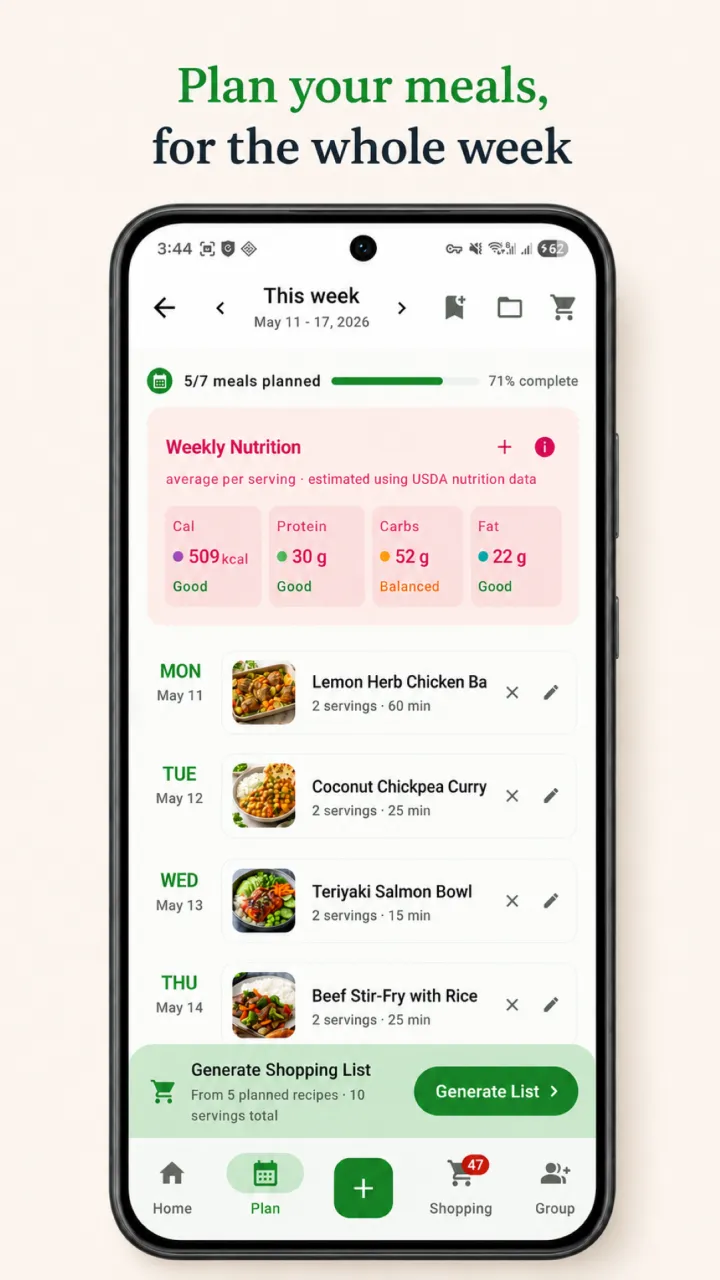
A useful automatic grocery list is more than a dump of ingredient lines. It needs to preserve what each recipe requires, reduce obvious double-ups and remain easy to correct when two similar ingredients are not truly interchangeable.
The recipe-to-grocery-list workflow
Save recipes in a structured format
Start with recipes whose ingredients and quantities are separated from their instructions. You can enter a recipe manually or import it from a website, photo, screenshot or handwritten card, depending on the recipe manager you use.
After any import, check the ingredient list before planning. Photo extraction and website formatting can make mistakes, particularly with fractions, abbreviated units and headings such as “for the sauce”. The source recipe remains the reference.
If your collection is still spread across bookmarks, screenshots and paper, use our guide to organising recipes digitally first.
Add only the meals you intend to cook
Place the recipes on the relevant days in your meal plan and adjust the plan for your household. A list based on seven aspirational dinners is not useful if you realistically expect to cook four, eat leftovers twice and go out once.
Check the serving size as well. A recipe written for two people may need different quantities for a family of four, while a large batch recipe may already cover two nights.
Generate one list from the plan
The grocery-list step should bring the planned recipes together. RecipeRun is designed to generate a grocery list from the weekly meal plan, avoid obvious double-ups and update the list when the plan changes.
That connection matters. If Tuesday's tacos become a stir-fry, the list should follow the plan rather than leaving you to remember which ingredients to remove and add by hand.
Review before shopping
Automation provides a first draft, not permission to stop thinking. Before you head to the shops:
- Remove ingredients already in the pantry, fridge or freezer.
- Check whether quantities were combined in compatible units.
- Keep different forms separate when they are not interchangeable.
- Add household items that do not come from recipes.
- Confirm dietary, allergen and brand requirements yourself.
- Review the source recipe if an extracted quantity looks unusual.
A worked example
Suppose the plan contains vegetable pasta, chicken tacos and banana pancakes. The recipes include these lines:
Swipe horizontally to compare
| Recipe | Ingredient lines relevant to the example |
|---|---|
| Vegetable pasta | 1 onion, 2 cloves garlic, 500 g spaghetti, 1 tin diced tomatoes |
| Chicken tacos | 1 red onion, 2 cloves garlic, 8 tortillas, 500 g chicken breast |
| Banana pancakes | 2 bananas, 2 eggs, 250 ml milk, 1 cup flour |
A sensible combined list may keep brown onion and red onion separate, combine the garlic into four cloves, and leave the other products as individual grocery items. It should not merge every line merely because two words look similar.
Swipe horizontally to compare
| Grocery item | Review decision |
|---|---|
| Brown onion | Keep separate from red onion if the distinction matters to the recipes |
| Red onion | Keep as its own item |
| Garlic | Combine the compatible quantities from two recipes |
| Spaghetti | Keep the required form and quantity |
| Diced tomatoes | Check the required tin size if the recipe omitted it |
| Tortillas | Check pack size against the eight required |
| Chicken breast | Keep the stated quantity and any preparation notes |
| Bananas, eggs, milk and flour | Remove or reduce anything already at home |
This example describes a review method. It is not a claim that every app will parse, scale or combine every ingredient in exactly this way.
What should and should not be combined?
Usually safe to review as one item
Ingredients may be combined when the food, form and units are compatible. Examples include two entries for garlic cloves, two quantities of the same dried pasta, or milk measured in millilitres and litres after a correct conversion.
Often better kept separate
Names that look related can still describe different products:
- Plain flour and self-raising flour.
- Fresh coriander and ground coriander.
- Diced tomatoes and tomato paste.
- Red onion and brown onion.
- Chicken breast and chicken thigh.
- Full-cream milk and lactose-free milk.
If the cooking result, dietary suitability or preferred product could change, keep the items separate until a person confirms the match.
Quantities that need human judgement
“One bunch”, “one packet”, “to taste” and “a handful” rarely convert neatly into standard quantities. Even a precise recipe amount may not match the pack sold by a supermarket. A recipe can require 300 g while the smallest suitable pack is 500 g.
The grocery list should preserve the recipe need; the shopper still chooses the product and pack.
How RecipeRun handles the workflow
RecipeRun combines a searchable recipe library, weekly meal planner and grocery list in one mobile app. You can:
- Save recipes from websites or add them from recipe photos and handwritten cards.
- Review and edit an imported recipe before using it.
- Add recipes to the weekly plan.
- Generate the grocery list from the plan without retyping every ingredient.
- Change the plan and keep the list aligned with it.
- Use a Family Group to share recipes, the plan and the grocery list, with list changes syncing for the household.
- In Australia, review indicative prices for selected matched products at chosen Woolworths, Coles and ALDI stores.
Grocery price and availability information can be cached, incomplete or different at checkout, so confirm the final product and retailer price before buying. See the RecipeRun Terms for the full limitations.
A five-minute pre-shop check
Use this routine after generating the list:
- Plan: Are all planned meals still happening?
- Serves: Do recipe quantities fit the number of people eating?
- Pantry: What is already at home, and is there enough?
- Matches: Were different ingredients combined by mistake?
- Packs: Will the available product size cover the recipe quantity?
- Household: Has anyone added breakfast, lunch or non-food items?
- Checkout: Are the selected product, price and availability still current?
This short review catches most of the errors that make an automatic list feel unreliable.
Frequently asked questions
Can an app make a grocery list from several recipes?
Yes. A recipe manager with meal planning can collect ingredients from several planned recipes into one grocery list. Review the result for incompatible units, pantry items and ingredients with similar names but different uses.
Will an automatic grocery list remove duplicates?
It can combine compatible entries, but “duplicate” is not always a simple text match. Red onion and brown onion, for example, may need to remain separate. Treat the generated list as a reviewed draft.
What happens when I change my meal plan?
In RecipeRun, the grocery list follows the weekly plan, so changing planned recipes can update the ingredients you need. Check any manual list edits and pantry decisions again after a substantial change.
Can I share the list with my family?
RecipeRun's Family Groups let household members share recipes, a weekly meal plan and a grocery list. When someone checks or unchecks a shared item, the change syncs for the group.
Try the recipe-to-list workflow
Explore RecipeRun as a recipe manager with a grocery list, see how its shared family grocery list works, or download it free on Google Play and the App Store.
Disclosure
This guide is published by the team that makes RecipeRun. Examples explain a workflow and do not promise that automated extraction or ingredient matching will always be accurate. Review imported recipes and grocery items before relying on them.